
Auth bugs pay the most in bug bounty. Account takeovers. Token theft. Session hijacks. Six figures on a single report, sometimes more.
And most hunters never touch them.
Not because they can't. Because they don't actually understand auth. They see state, code_challenge, redirect_uri sitting in their proxy and they scroll past it. They open a JWT, squint at the three parts, and close the tab. I don't blame them. Every guide opens with a textbook definition. RFC this, specification that. By the time you finish, you still can't tell me why redirect_uri exists. You still can't tell me what it actually protects.
So this article throws all of that out.
I'm going to show you auth the way the developer who built it sees it. Why each piece exists. What it protects against. What assumption it's quietly making about you. By the end, you'll open any auth flow on any target and see the seams. The places where the developer trusted something they shouldn't have. The places where the bug lives.
We cover all of it. Sessions and cookie flags, JWTs, OAuth 2.0, the Authorisation Code Flow, PKCE, OAuth 2.1, and OpenID Connect. Each one explained the way an attacker reads it.
One thing up front. I'm not breaking any of these flows here. That's a separate piece, and it's already in the works. But you can't break what you don't understand, so we start with understanding. Read this one properly and the breaking video will land like second nature.
TL;DR
- Authentication is "who are you?" Authorisation is "what are you allowed to do?" Auth bugs almost always live in the second one.
- Sessions keep your identity on the server and hand you a cookie. JWTs carry your identity in a signed token, so there is no lookup. Same job, opposite trade-offs.
- OAuth 2.0 is delegated authorisation, not login. OpenID Connect (OIDC) is the layer that adds identity, through the
id_token. - The Authorisation Code Flow with PKCE is the modern default.
state, exactredirect_urimatching, and PKCE enforcement are what keep it safe. - Most findings come from one missing protection: no
HttpOnly, nostate, a looseredirect_uri, an unverified JWT signature, or an uncheckedemail_verified.
1. The Two Questions Every System Has To Answer
Every system on the internet has to answer two questions about every single request that comes in.
The first is "who are you?" That's authentication. The login flow. The password check. The session cookie. The token in your header. Anything that proves you're not a stranger walking in off the street.
The second is "what are you allowed to do?" That's authorisation. The permission check. The role check. The ownership check. The scope enforcement. The thing that decides whether this specific user can perform this specific action on this specific resource.
Two completely separate decisions.
| Authentication | Authorisation | |
|---|---|---|
| Question | Who are you? | What are you allowed to do? |
| Decides | Identity | Permission |
| Examples | Login, session cookie, JWT, bearer token | IDOR check, role check, ownership check, scope enforcement |
| How it's built | Library, session manager, standard pattern | Custom code on every endpoint |
| Maturity | Solved problem | Reinvented on every route |
Here's the part nobody points out clearly enough. Most companies get the first one right and the second one wrong.
Authentication is a solved problem. Use a library. Plug in a session manager. Hash your passwords. Done. The patterns are well known and the tooling is mature.
Authorisation is custom code. Every endpoint has its own logic. Every action has its own check. Every resource has its own ownership model. Nothing is reusable. It has to be implemented over and over again, by hand, on every single route.
That's why the bugs live there.
Think about every broken access control bug you've ever read in a writeup. An IDOR where you swap a user ID and pull someone else's data. The server authenticated you correctly. It knew exactly who you were. It just didn't check whether the resource you touched belonged to you. Authentication passed. Authorisation failed.
A privilege escalation where a regular user calls an admin endpoint. The server knew you were logged in. It just didn't check that you had the admin role. Authentication passed. Authorisation failed.
An OAuth scope bypass where a token with read:email is used to write to a calendar. The server verified the signature. It just didn't enforce what that token was actually allowed to do. Authentication passed. Authorisation failed.
Same pattern, every time. The bug is never in the login. The bug is in the gap between knowing who you are and knowing what you can do.
Why any of this is hard in the first place
HTTP is stateless. That's the root of everything.
HTTP was designed in 1991 to serve documents. You ask for a page, the server gives you a page, the connection closes, and the server immediately forgets you exist. The next request is a fresh start. No memory. No history. No identity.
For documents, fine. For applications, useless. If the server forgets you between requests, how does it know who's making the second one?
Every authentication mechanism you've ever seen exists to solve that exact problem. The session cookie. The bearer token. The JWT in the Authorization header. The signed assertion in a SAML response. Every one of them is the same trick. The client carries proof of identity on every single request, and the server uses that proof to remember who you are.
That's all auth is. A long chain of workarounds because the underlying protocol forgets you the moment you finish your request.
And every workaround has assumptions baked into it. Every assumption is a place where a developer trusted something they shouldn't have. Every trust gap is where you and I get paid.
So carry this frame through the rest of the article. For every request you intercept on every target, ask two things. How does the server know who I am here. And how does the server know I'm allowed to do this. If you can answer both with confidence, the surface is solid. If either answer is "the server is trusting the client," you've already found a bug.
Authentication is identity. Authorisation is permission. The gap between them is where you live.
2. Passwords, Hashing, and Sessions
Start with the simplest authentication mechanism on the internet. A username and a password.
When you submit a login form, your browser sends a POST with your credentials. The server has to decide two things. Is this username real. And does the password match.
So how does the server know if the password matches?
The server doesn't store your password. Not directly. If it did, every database leak would be catastrophic. Your password would be sitting in a CSV file somewhere, plaintext, next to ten million others. Instead, the server stores a hash of your password.
A hash is a one-way function. Easy to compute forward, impossible to reverse. You give it a string, it gives you a fixed-length value back. The same input always produces the same output. But going the other way, from hash back to the original string, is computationally infeasible.
Modern password hashing has two properties that matter for hunters.
It's slow on purpose. A configurable work factor. Every password verification takes 100 milliseconds, maybe more. That's nothing for a real user logging in once. For an attacker holding a leaked hash database, it's the difference between cracking everything in a day and cracking nothing in a decade.
It's salted. A salt is a random unique value added to your password before hashing. So even if two users both pick password123, their stored hashes are completely different. This kills rainbow tables. Attackers can't precompute a dictionary of hashes ahead of time, because they don't know the salt until they have the leak.
The algorithms you want to see by name are bcrypt, scrypt, and Argon2. If those show up in a writeup, the company did the right thing. If you see MD5 or SHA1 with no salt, GPU farms crack the entire database in a weekend.
| Hashing approach | Verdict | Why |
|---|---|---|
| bcrypt / scrypt / Argon2 | Correct | Slow, salted, tunable work factor |
| Salted SHA-256 | Weak | Fast hash, crackable at scale |
| MD5 / SHA1, unsalted | Broken | Rainbow tables and GPU cracking demolish it |
| Plaintext | Catastrophic | One leak ends every account |
The takeaway is simple. The server never has your password. It has a stretched, salted hash. When you log in, the server hashes what you sent with the stored salt and compares the two hashes. Match means you're authenticated.
But authentication is only the first request. What happens on the second one?
Sessions
HTTP is stateless. The server forgets you the moment your login request finishes. So the server creates a session.
A session is a record on the server side. It says "user 12345 logged in at this time, here are their permissions, here's their last activity." The session has a unique identifier. A random string, long enough that nobody can guess it. That string is the session ID.
The server sends that session ID back to your browser as a cookie. The browser stores it. From that moment on, every request your browser makes to that domain automatically includes the cookie. The server reads the cookie, looks up the session, and remembers who you are.
Here's the classic login flow as a sequence:
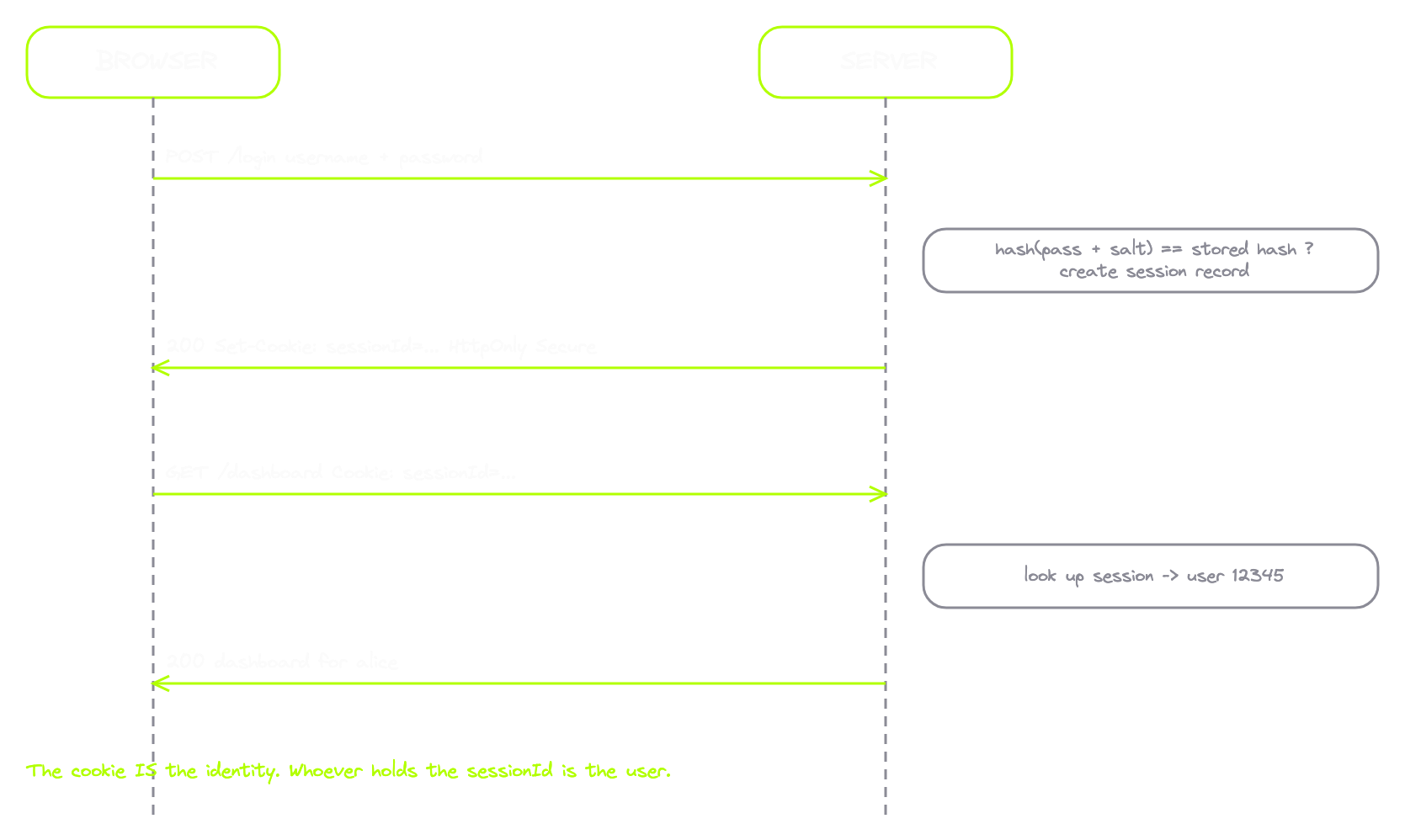
Now let's look at the actual traffic. This is the login request out of the auth-sessions lab:
POST /login HTTP/2
Host: amrsec.app:3000
Content-Type: application/x-www-form-urlencoded

username=alice&password=password123
Username and password in the body. Nothing complicated. Here's the response:
HTTP/2 302 Found
Location: /dashboard
Set-Cookie: sessionId=8f3b2c9a1e7d4f06b5a2c8e1d9f00a3c; HttpOnly; Secure; SameSite=Lax
Set-Cookie. The server just handed my browser a session ID. That random string is my identity now. And on the very next request, the browser sends it back automatically:
GET /dashboard HTTP/2
Host: amrsec.app:3000
Cookie: sessionId=8f3b2c9a1e7d4f06b5a2c8e1d9f00a3c
Same cookie, riding on every subsequent request, automatically. The server reads this on every hit and looks up who I am.
Now the part that matters more than people realise. Take that sessionId value, paste it into a fresh browser profile as a cookie on the same domain, refresh /dashboard, and you're logged in as alice. No password needed.
The session cookie is not a key that unlocks your account. The session cookie is your account. To the server, you are not a user. You are a string of bytes in a cookie header. Whoever has the string is the user.
Which is exactly why the rest of this section matters.
The three cookie flags that matter
If the cookie is everything, the cookie has to be protected. The protections are built into the cookie itself, as flags. The spec defines dozens of cookie attributes. For a hunter, three matter more than all the rest combined.
| Flag | What it does | What its absence enables |
|---|---|---|
HttpOnly | JavaScript can't read the cookie. document.cookie can't see it. | Every XSS on the domain becomes session theft and full account takeover |
Secure | Cookie only sent over HTTPS, never plain HTTP. | Cookie leaks on any accidental HTTP request, sniffable on the wire |
SameSite | Controls whether the cookie rides on cross-site requests. | None (or missing on old browsers) opens the door to CSRF |
HttpOnly. When a cookie has it, JavaScript can't read it. document.cookie pretends it doesn't exist. Why does that matter? Because XSS exists. If an attacker runs JavaScript in your page, the first thing they want is your session cookie. Without HttpOnly, the attacker writes one line, document.cookie, ships the result to their server, and now they have your session. With HttpOnly, that exact attack doesn't work. The XSS still runs, but the cookie is invisible to it. See a session cookie without HttpOnly on a live target and that's a finding by itself. It turns every reflected XSS on that domain from an annoyance into an account takeover chain.
Secure. When a cookie has it, the browser only sends it over HTTPS. Plain HTTP requests get no cookie at all. Why does that matter? Plain HTTP is readable on the wire. A coffee shop attacker on the same network sniffs packets and pulls cookies out. With Secure, even if the user accidentally loads http://target.com/something, the cookie stays in the browser. Missing Secure on an HTTPS site is a clean finding. Low to medium most of the time, but reliable.
SameSite. The most misunderstood of the three. It controls when the browser sends the cookie on cross-site requests. Three values:
| Value | Behaviour |
|---|---|
Strict | Never sent if the request came from a different site. Most locked down. Also breaks "click a link from another site and arrive logged in." |
Lax | Sent on top-level navigations (clicking a link) but not on cross-site subresource requests (an image on another site firing a GET at your target). This is the modern default since Chrome 80, early 2020. A cookie with no explicit SameSite is treated as Lax. |
None | Sent on every cross-site request regardless of how it started. The old behaviour. Requires Secure, or modern browsers reject the cookie entirely. |
Why does this matter? CSRF. The classic attack where you trick a logged-in user into visiting your malicious site, and your site fires a request at the target. Before SameSite, that request automatically carried the user's session cookie, and the server treated it as legitimate. With Lax or Strict, the cookie doesn't go along for the ride, and the CSRF dies on arrival. A session cookie with SameSite=None on a site that doesn't actually need cross-site sending is a CSRF surface worth investigating.
In DevTools, you read all three at a glance. Application tab, Cookies, pick the origin, and the table shows Name, Value, HttpOnly, Secure, and SameSite as columns. A responsibly configured session cookie shows HttpOnly checked, Secure checked, SameSite set to Lax. If any of those is blank on a session cookie, call it out and you already know the attack it opens.
Where the session model breaks
That's the entire classic model. Password gets hashed. Server stores the hash. User logs in. Server creates a session. Server sends a session ID as a cookie. Cookie travels on every future request, protected by three flags. It has been the foundation of web apps for thirty years.
Here's where it breaks:
- Predictable session IDs. The ID has to be unguessable. If it's a sequential counter, an attacker increments and walks the entire user table. Modern frameworks use cryptographically random IDs, so this is mostly solved. Legacy and internal apps still get it wrong more often than you'd think.
- No invalidation on logout. Some apps just clear the cookie from your browser and call it done. The server-side session record is still alive. Anyone who stole your cookie before logout still has a valid session after logout. Real logout destroys the session on the server, not just in the browser.
- No expiry. Sessions that never time out never get cleaned up. A leaked cookie from two years ago should not still log you in. Real sessions have a TTL and the store enforces it.
- Missing flags. Missing HttpOnly turns every XSS into account takeover. Missing Secure turns every accidental HTTP request into a credential leak. Missing SameSite turns the site into a CSRF playground.
The session ID is the account. Every flag on it is a wall around it. Every wall that's missing is a path to ownership.
3. JWTs: When the Token Is the Session
Sessions have a problem.
Every request hits the database. Browser sends the cookie. Server pulls the session ID. Server looks up the session in the store. Server finds the user. Server processes the request. For a small app, nothing. For an app handling a billion requests a day, that's a billion database lookups just to figure out who's sending each request, before any real work happens.
Then microservices showed up. Now you've got ten backend services, each one needs to know who you are, and they're all hammering the same session store. The store becomes a bottleneck. Then a single point of failure.
So engineers asked a question. What if the proof of identity carried itself? What if the cookie was the entire session, not just an ID pointing to one?
That's a JWT. JSON Web Token. The most popular implementation of stateless authentication on the modern web.
The idea is simple. Instead of keeping a session record and handing you a pointer to it, the server packages all the relevant information about you into a token, signs it cryptographically, and gives you the token directly. From then on, every time you send the token back, the server reads it, checks the signature, and trusts the contents. No lookup. No state. The token is the session.
That's a real win for scaling. It also opens an entirely new category of bugs that don't exist in the classic session model, because now the token itself has to be tamper-proof, and a lot of servers get that wrong.
Anatomy of a JWT
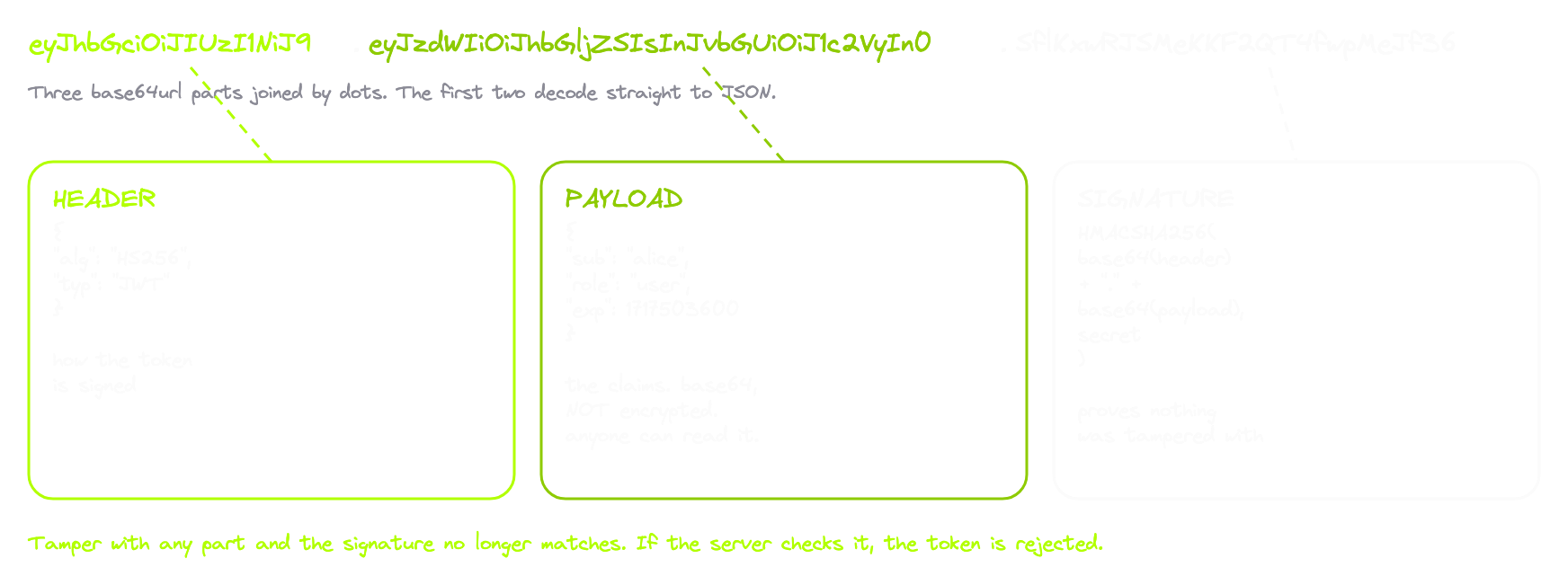
A JWT is three pieces, separated by dots. Each piece is base64url encoded. Here's a real one, line-wrapped so you can see the structure:
eyJhbGciOiJIUzI1NiIsInR5cCI6IkpXVCJ9      <- header
.eyJzdWIiOiJhbGljZSIsIm5hbWUiOiJBbGljZSIsImVtYWlsIjoiYWxpY2VAYW1yc2VjLmFwcCIsInJvbGUiOiJ1c2VyIiwiaWF0IjoxNzE3NTAwMDAwLCJleHAiOjE3MTc1MDM2MDB9      <- payload
.JxX8m2sVQ1m6mfFvD9oZc1Vd3rТ8qoZtq2wXc3aLp0      <- signature
The moment those first two segments decode, they become plain JSON you can read.
Header. Tells you how the token was signed.
{
  "alg": "HS256",
  "typ": "JWT"
}
Payload. The actual claims. Who the token is for, when it was issued, when it expires, what they're allowed to do.
{
  "sub": "alice",
  "name": "Alice",
  "email": "[email protected]",
  "role": "user",
  "iat": 1717500000,
  "exp": 1717503600
}
Signature. The only thing keeping the rest honest. Without it, anyone could forge a token. With it, the server can prove the token was issued by them and that nobody tampered with it in transit.
One thing to burn into your head before going further. The payload is not encrypted. It's base64. Anyone holding the token can read every claim inside it. Decoding tools like jwt.io do it all in your browser, so the token never leaves your machine, which makes them safe for learning. But it also means you should never put secrets in a JWT payload. People do it constantly.
Reading the payload like a hunter
The first thing you do when you find a JWT on a target is decode it and read the claims. Half the time you find more than the app should be exposing. Internal user IDs. Permission flags that hint at admin panels. Source-of-truth identifiers from backend systems. All sitting in plain text, base64 wrapped, in a token the app handed you directly.
The other thing the payload tells you is what the app trusts. Take the decoded payload and change "role": "user" to "role": "admin". The encoded token rebuilds itself with new base64. And the signature immediately reads as invalid:
Signature: INVALID
That's the entire security model in one move. The signature is computed over the header and payload combined. Change a single character and the signature no longer matches what the server signed. If I tamper, the signature breaks. If the server actually checks the signature, my tampered token gets rejected. Game over.
If the server actually checks the signature. Hold onto that phrase.
HS256 vs RS256
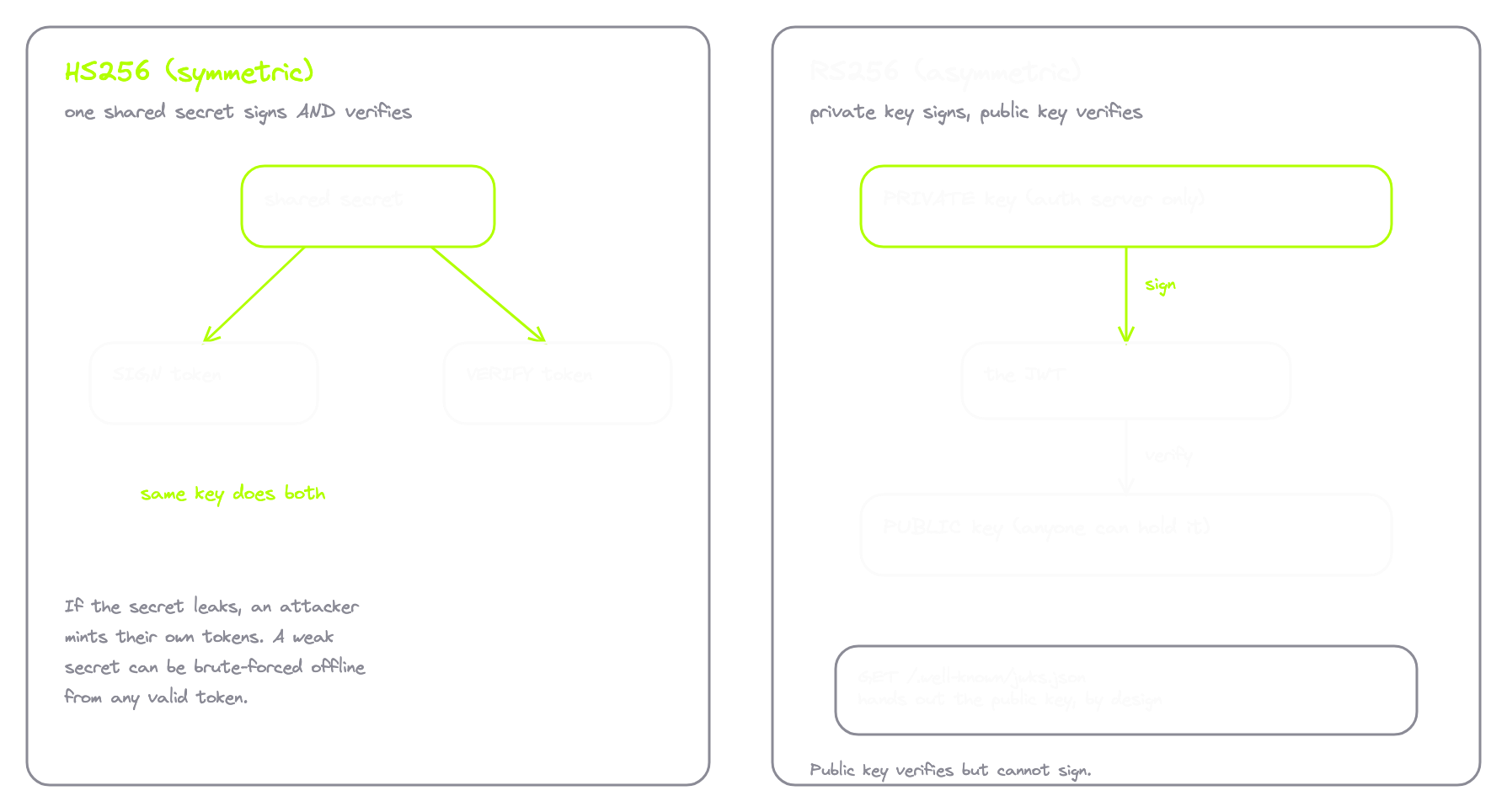
You need to know the two main ways JWTs are signed, because the difference creates an entire attack surface on its own.
| HS256 (HMAC-SHA256) | RS256 (RSA-SHA256) | |
|---|---|---|
| Type | Symmetric | Asymmetric |
| Keys | One shared secret | Private key + public key |
| Who can sign | Anyone with the secret | Only the holder of the private key |
| Who can verify | Anyone with the secret | Anyone with the public key |
| Best fit | Single server | Distributed systems, many verifiers |
| Public key exposure | N/A | Published openly at /.well-known/jwks.json |
| Main risk | Weak/short secret brute-forced offline | Key confusion if the server mishandles alg |
HS256 is symmetric. One secret key. The server uses that single secret to sign tokens and the same secret to verify them. Whoever has the secret can both create and validate tokens. This is fine when there's one server. The risk is that if the secret leaks, an attacker mints their own tokens with whatever claims they want. So secret strength matters. A short or weak HS256 secret can be brute-forced offline once you have any valid token. That's a real bug class.
RS256 is asymmetric. Two keys. A private key only the server has, and a public key the server hands out to anyone. The server signs with the private key. Anyone with the public key can verify, but the public key cannot create new tokens. This is why large systems use RS256. The auth server holds the private key. Every other service just needs the public key to verify. There's usually an endpoint at /.well-known/jwks.json that hands it out openly, by design.
So when you intercept a JWT, look at alg in the header. HS256 means symmetric signing with a single shared secret on the backend. RS256 means a keypair, and the public key is likely sitting on a JWKS endpoint you can fetch yourself. The validation logic for each looks different, and so do the bugs.
What the server is supposed to do
When a JWT comes in, correct validation runs five steps:
- Decode the header. Read the
algfield. - Verify the signature with the correct key. HS256 means the shared secret. RS256 means the public key for the issuer that minted this token.
- Check expiration. The
expclaim is a timestamp. In the past means reject, no matter how perfect the signature is. - Check the other claims.
issshould match the expected issuer.audshould match this server, so a token meant for one service can't be replayed against another.nbf, if present, says the token isn't valid yet. - Trust the rest of the payload. Once the signature is valid and the standard claims check out, the server treats the rest as ground truth. Whatever role, scope, or permission is in there, that's who this user is.
That last step is the whole reason JWTs are powerful and the whole reason they're dangerous. If the chain works, the server authoritatively trusts the payload with no DB lookup. Just math. If the chain has a single weak link, the server now trusts whatever the attacker put inside.
The seam
Here's the assumption every JWT implementation makes. The server trusts the algorithm the client tells it to use.
Read that again. The algorithm is in the header. The header is part of the token. The token comes from the client. So the algorithm the server verifies with is, technically, a value the client controls.
That's the entire bug class right there. The famous version is alg:none, where an old library accepts a token whose header declares the algorithm is "none" and skips signature verification entirely. Another is RS256-to-HS256 confusion, where the server takes the public key it was supposed to verify with and uses it as an HMAC secret instead. And there's a whole family of header-field abuse around kid, jku, and x5u, where the attacker tricks the server into fetching the wrong key.
None of those are exploits I'm running here. They're the rooms upstairs. We're still building the foundation. For now, hold this. A JWT is three base64 strings joined by dots. The payload is readable by anyone. The signature is the only thing protecting it. And the algorithm used to verify that signature is declared by the same untrusted party that sent the token in.
That's the seam.
4. OAuth 2.0 From Zero
Sessions and JWTs both solve the same problem. How does a single app remember who you are between requests.
OAuth solves something different. How do two apps work together on your behalf, without you handing one of them the keys to the other.
Say you use Calendly. Calendly needs access to your Google Calendar so it can check availability and book meetings. How does Calendly actually do that?
Before OAuth, the answer was uncomfortable. You gave Calendly your Google password. Calendly stored it on their servers. When they needed your calendar, they logged in as you. This was the standard pattern across the entire internet for years. It even had a name. The password anti-pattern.
Think about what that meant. You handed your master credentials to a third party. Once they had your password they could read your email, change your password, take over your account. You couldn't revoke their access without changing your password, which would break every other app and device you used Google with. And if Calendly got breached, your Google password was sitting in their database for whoever broke in.
So in 2010 a working group built a protocol to fix exactly this. One question. How do you give Calendly access to your Google Calendar without giving them your Google password?
That protocol is OAuth 2.0. It lets you delegate a specific capability without delegating your identity. Calendly gets the ability to read your calendar. Not your password. Not your email. Not your account. Just calendar read access, scoped to exactly what it needs, that you can revoke any time with one click. Delegated authorisation without credential sharing.
The biggest misunderstanding about OAuth
OAuth is not an authentication protocol.
You see "Sign in with Google" everywhere and you assume that button is OAuth. It's not. It's OAuth plus another layer called OIDC, which we get to later. OAuth answers "what is this app allowed to do with my data?" It does not answer "who is this user?" Different questions. Login flows often piggyback on OAuth, which is why people conflate them, but OAuth itself carries permissions, not identity. Apps that treat OAuth as authentication can be tricked, because the protocol was never designed to tell the app who the user is. We come back to that.
The four roles
Every OAuth flow has four roles. Memorise these. Every bug you'll ever find in this space lives between two of them.
| Role | Who it is | In the Calendly example |
|---|---|---|
| Resource Owner | You, the user who owns the data | You, the owner of the calendar |
| Client | The app that wants access | Calendly |
| Authorisation Server | Authenticates the user and issues tokens | Google (accounts.google.com) |
| Resource Server | Holds the protected data and enforces access | Google Calendar API (googleapis.com) |
Sometimes the auth server and the resource server are the same company on the same backend, like Google. Sometimes they're two completely different systems. The roles stay separate even when they live on the same machine, because the trust relationship between them is where some of the nastiest OAuth bugs live.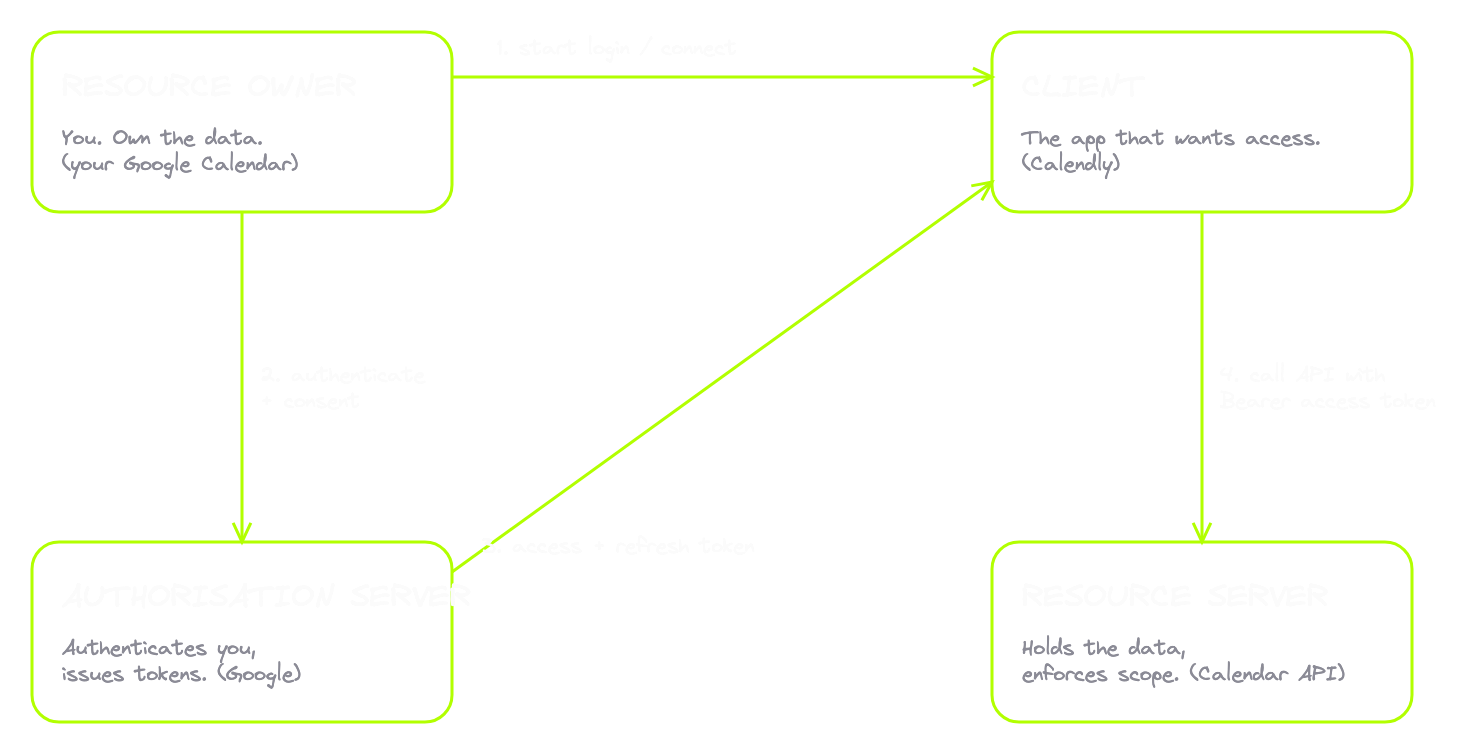
The two tokens
After a flow completes, the client walks away with two things.
The access token. The thing you actually use to call the API. Every time Calendly wants your calendar, it sends a request to the Google Calendar API with the access token in the Authorization header, prefixed with Bearer. As in, "I am bearing this token, accept me on its strength." The server checks the token, sees it's valid with the right scope, and serves the data. Access tokens are short-lived, usually minutes to an hour. The reason is simple. If the token leaks, you want the damage window small.
The refresh token. Long-lived. Days, months, or until the user revokes it. You never use a refresh token to call the API. The resource server doesn't even understand refresh tokens. Its one job is this: when your access token expires, you send the refresh token to the authorisation server's token endpoint, and the server hands you a fresh access token. No new login. No popup. The client silently rotates the access token in the background.
| Access token | Refresh token | |
|---|---|---|
| Used to | Call the resource server's API | Get a new access token |
| Sent to | Resource server | Authorisation server only |
| Lifetime | Short (minutes to an hour) | Long (days to months) |
| If it leaks | Small damage window | Attacker can mint access tokens until it's revoked |
That's why the system uses two tokens. You get the security of short-lived access tokens and the user experience of long-lived sessions, both at once.
Refresh token rotation and reuse detection
There's a problem with this design. The refresh token is now the long-lived secret. Steal it and you keep generating fresh access tokens for as long as it's valid, which might be months.
So modern OAuth uses refresh token rotation. Every time the client uses a refresh token to get a new access token, the server doesn't just hand back a new access token. It also hands back a brand new refresh token and immediately invalidates the old one. The refresh token is single-use. The moment you redeem it, it dies, and you get a fresh one in its place.
Now picture the attacker stealing a refresh token. They use it. They get a fresh access token and a fresh refresh token. The old one is dead. They think they're set. Then the real user's app tries to refresh. Their refresh token, the original, is also dead, because the attacker already used it. When they hit the token endpoint, the server sees a refresh token that has already been redeemed.
That's the signal. Reuse of a single-use token is the fingerprint of theft. The server can't tell which side is the attacker and which is the real user, so it does the safe thing. It revokes the entire token family. Every token descended from that original authorisation dies. Both sides have to log in again. The damage stops there.
That's reuse detection, and it's why rotation is mandatory in OAuth 2.1 for public clients like mobile apps and SPAs. Without rotation, a stolen refresh token is a multi-month backdoor. With rotation, the moment theft happens the server notices and shuts everything down. If you see refresh tokens that don't rotate, that's worth investigating. If you see rotation but the server doesn't detect reuse, that's an even bigger issue. Both are real findings in real programs.
Scopes
A scope is a string that says "this access is allowed to do this specific thing." When Calendly asks Google for permission, it doesn't ask for "access to your account." It asks for specific scopes. Maybe calendar:read if it only wants availability. Maybe calendar:read calendar:write if it also needs to create events.
You see scopes on the consent screen. "Calendly wants to: Read your calendar events. Create events on your calendar." Every line maps to a scope being requested. When you approve, the token is bound to those exact scopes. If Calendly tries to use that token to read your email, the resource server is supposed to look at the scope, see email isn't included, and reject the request.
"Supposed to" is doing a lot of work in that sentence.
Scope enforcement is the resource server's job. The token contains the scope. The resource server has to look at it on every single API call and decide whether the action is allowed. If it skips that check, scopes mean nothing and the token becomes a generic "this user gave us some access" pass that opens every door. This is one of the most common OAuth bugs in production, because server-side scope enforcement is custom logic on every endpoint, exactly the kind of thing developers forget on the endpoints they didn't think hunters would check.
And any scope check that happens client-side is decorative. If the frontend shows or hides a button based on your token's scope, that's a UX feature, not a security control. The attacker doesn't use the button. The attacker calls the API directly. The only check that matters is the one on the server.
So the full picture. Four roles. Two tokens, a short-lived access token to call the API and a long-lived refresh token to stay logged in silently. Refresh tokens rotate and reuse detection catches theft. Scopes describe what the access can do, and the resource server has to enforce them on every call. That's OAuth 2.0. The protocol that lets one app act on your behalf in another app's data, without your password ever changing hands.
5. The Authorisation Code Flow
Now you've got the model. Four roles, two tokens, scopes. Time to see how they move on the wire.
OAuth defines multiple flows. We'll cover all of them, but first we go deep on one. The Authorisation Code Flow. This one matters more than the others combined. It's the most common flow on the modern web. Google, GitHub, Microsoft, Auth0, Okta all use it as their default. Every "Sign in with X" button fires this exact flow under the hood.
It's also where the most bugs live. Not because the flow is weak, but because there are six steps, and each step is a place a developer can get something subtly wrong.
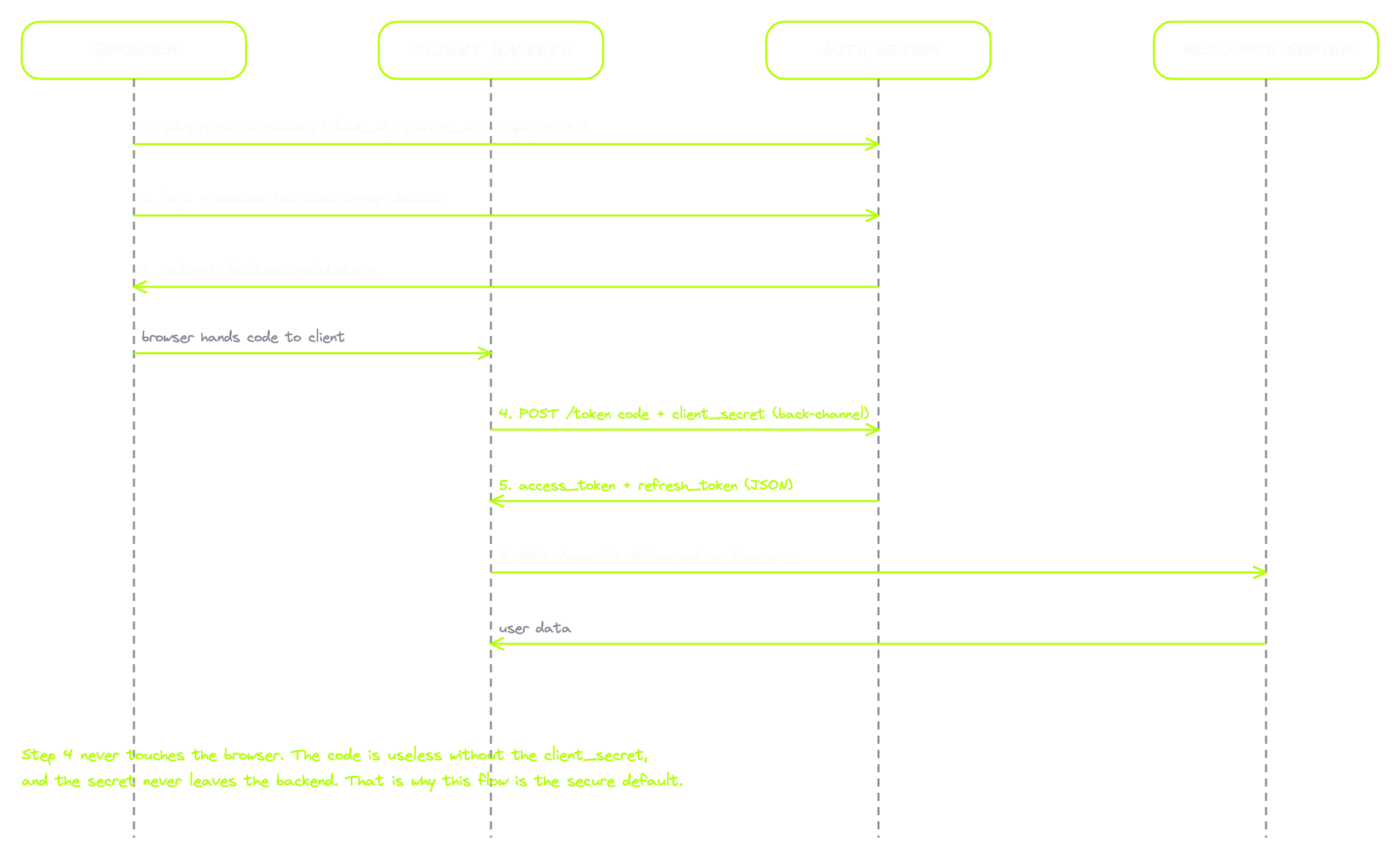
The six steps
Step 1. The redirect. The client builds a URL pointing at the authorisation server and redirects the browser there. Five parameters matter:
GET /authorize?response_type=code
  &client_id=client_code
  &redirect_uri=https://amrsec.app:3201/callback/code
  &scope=profile email
  &state=k7Hq2Lp9Xc HTTP/2
Host: amrsec.app:3200
| Parameter | What it does |
|---|---|
response_type=code | Tells the server we're using this specific flow |
client_id | Identifies which application is asking |
redirect_uri | Where to send the user back. Must match what the client registered |
scope | The permissions being requested |
state | A random value the client binds to the user's session. The single most important parameter from a security view |
Step 2. The user logs in and approves. At the auth server, the user authenticates and sees the consent screen. "Calendly wants to access your calendar. Allow or deny." This entire step happens on the auth server's domain, not the client's. The client never sees the user's password. The client never sees how the user authenticated at all. It just trusts that the auth server did its job.
Step 3. The redirect back, with a code. The user clicks Allow. The auth server redirects the browser back to the registered redirect_uri with two parameters:
GET /callback/code?code=SplxlOBeZQQYbYS6WxSbIA&state=k7Hq2Lp9Xc HTTP/2
Host: amrsec.app:3201
code is the authorisation code. Not a token. A one-time, short-lived ticket the client can exchange for actual tokens. Usually valid ten minutes max, usually single-use, dead once redeemed. state is the same value the client sent in step 1, echoed back. The client has to verify it matches what it originally sent. If it doesn't, this callback didn't originate from this user's session. Reject it.
Step 4. The back-channel exchange. This is the part most people miss. The client takes the code and makes a server-to-server POST directly to the token endpoint. The browser is not involved in this request at all.
POST /token HTTP/2
Host: amrsec.app:3200
Content-Type: application/x-www-form-urlencoded

grant_type=authorization_code
&code=SplxlOBeZQQYbYS6WxSbIA
&redirect_uri=https://amrsec.app:3201/callback/code
&client_id=client_code
&client_secret=s3cr3t_only_the_backend_knows
The client_secret is a long random string only the client's backend knows. It proves the exchange is happening from the legitimate client, not from someone who intercepted the code.
Step 5. The auth server returns the tokens. JSON, server to server. The browser never sees any of this.
HTTP/2 200 OK
Content-Type: application/json

{
  "access_token": "2YotnFZFEjr1zCsicMWpAA",
  "refresh_token": "tGzv3JOkF0XG5Qx2TlKWIA",
  "token_type": "Bearer",
  "expires_in": 3600,
  "scope": "profile email"
}
Step 6. The client calls the resource server. The client now has an access token. It puts it in the Authorization header with the Bearer prefix and calls the API.
GET /userinfo HTTP/2
Host: amrsec.app:3200
Authorization: Bearer 2YotnFZFEjr1zCsicMWpAA
The API checks the token, verifies the scope, returns the data. The client renders the user's info on the dashboard.
Why the back-channel matters
The piece to remember is step 4, the exchange your browser never sees. That single design decision is why the Authorisation Code Flow is more secure than the older alternatives.
Think about why. The browser only ever holds the short-lived code. The code is useless without the client_secret. The secret lives on the backend, where the attacker can't reach it from the browser. So even if the attacker intercepts the code in transit, even if they exfiltrate it through some redirect flaw, they can't exchange it for tokens. They need the secret, and the secret never leaves the server. The flow was deliberately built so the most sensitive credentials never travel through the user's browser.
The same pattern across real providers
Once you can recognise this on one provider, you spot it everywhere. Here's Google's authorisation request:
GET /o/oauth2/v2/auth?response_type=code
  &client_id=1234.apps.googleusercontent.com
  &redirect_uri=https://amrsec.app:3300/callback/google
  &scope=openid%20email%20profile
  &state=xyz123 HTTP/2
Host: accounts.google.com
And here's GitHub's:
GET /login/oauth/authorize?response_type=code
  &client_id=Iv1.abc123
  &redirect_uri=https://amrsec.app:3300/callback/github
  &scope=user:email
  &state=xyz123 HTTP/2
Host: github.com
Same protocol. Same flow. Same five parameters. The only thing that changes is the host and the way scopes are named. Google uses URL-style scopes like https://www.googleapis.com/auth/calendar.readonly. GitHub uses short names like user:email or repo. Surface differences. Underneath, the exact same six-step dance. The callbacks come back the same way too, code and state through the redirect, both providers. Read this pattern on one and you can read it on Microsoft, Auth0, Okta, every OAuth provider in the world.
The three assumptions that have to hold
The security of this flow depends on each step being implemented correctly. Three assumptions have to hold. When any one breaks, the flow breaks with it.
| Assumption | What it stops | What breaks without it |
|---|---|---|
state is validated | Binds the callback to the original session | OAuth CSRF, account linking, account takeover |
redirect_uri matched exactly | Codes only go to URLs the client owns | Code theft, then token theft |
| Code is single-use | Each code redeems once | A captured code (Referer leak, server log, history sync) gets replayed |
State has to be validated. If the client receives the callback and trusts whatever state comes back without checking it against what it sent, the protection is gone. An attacker who can start a flow with their own account, capture the resulting code, and trick the victim into completing the callback can link the attacker's account to the victim's session. Or the inverse. Either direction, you have account takeover or account linking. The state check is what stops it.
Redirect URI has to match exactly. If the auth server allows partial matches, wildcards, or loose comparison, an attacker registers a malicious redirect URL that passes the check. The code gets sent to the attacker's URL instead of the legitimate one. Code theft, then token theft. OAuth 2.1 mandates exact string matching to close this, but many existing servers still allow weaker matching for backwards compatibility. That's where the bugs hide.
Code has to be single-use. The first valid exchange redeems it. Every later exchange fails. If the server lets the same code be redeemed twice, anyone who captures it has a window to redeem it before the legitimate client does.
Three classic Authorisation Code Flow bugs. State not validated. Redirect URI not strictly matched. Code not invalidated after use. Six steps. Six places to get something subtly wrong. Six places to look first when you're hunting a target that uses OAuth.
6. PKCE: Proof Key for Code Exchange
Remember what made the back-channel exchange secure? The client_secret. The thing only the client's backend knows.
That works for server-side applications. Calendly has a backend. Its secret lives in environment variables on its servers, not in any file the user can see. But OAuth isn't only used by server-side apps. It's also used by mobile apps and single-page applications. JavaScript that runs in the browser, with no backend in the auth flow. For those clients, the client_secret model falls apart.
Why? A mobile app is downloaded onto someone's phone. Anyone who installs it can extract the bundle and read the source. Put a client_secret inside an APK and it's not secret anymore. The first reverse engineer who looks has the key. Same for SPAs. The whole point is that the code runs in the user's browser. Any "secret" you ship to the browser is, by definition, visible to anyone who opens DevTools.
The spec has names for these two types:
| Client type | Can it keep a secret? | Examples |
|---|---|---|
| Confidential client | Yes | Server-side web apps |
| Public client | No | Mobile apps, SPAs, desktop apps with visible code |
The classic Authorisation Code Flow doesn't work for public clients. The client_secret protection doesn't exist, so an attacker who intercepts the authorisation code can exchange it for tokens without anything else. And on mobile, intercepting the code is genuinely possible.
The attack PKCE was built to stop
You build a mobile app called LegitApp. You register a custom URI scheme with the OS, something like legitapp://callback. When OAuth flows complete, the OS knows to send the callback URL to your app.
A malicious app on the same device, MaliciousApp, registers the exact same URI scheme. The operating system, on Android especially, has no strict rule about which app owns a custom scheme. Both claim the callback. When the provider redirects back to legitapp://callback?code=..., the OS might hand the redirect to MaliciousApp instead of LegitApp.
Now MaliciousApp has the authorisation code. Without PKCE, without a client_secret, it just hits the token endpoint with that code and gets the access token. Game over.
PKCE was designed specifically to make that impossible. Proof Key for Code Exchange. The idea is a per-flow secret the malicious app cannot intercept, no matter how clever it gets.
How PKCE works, seven steps
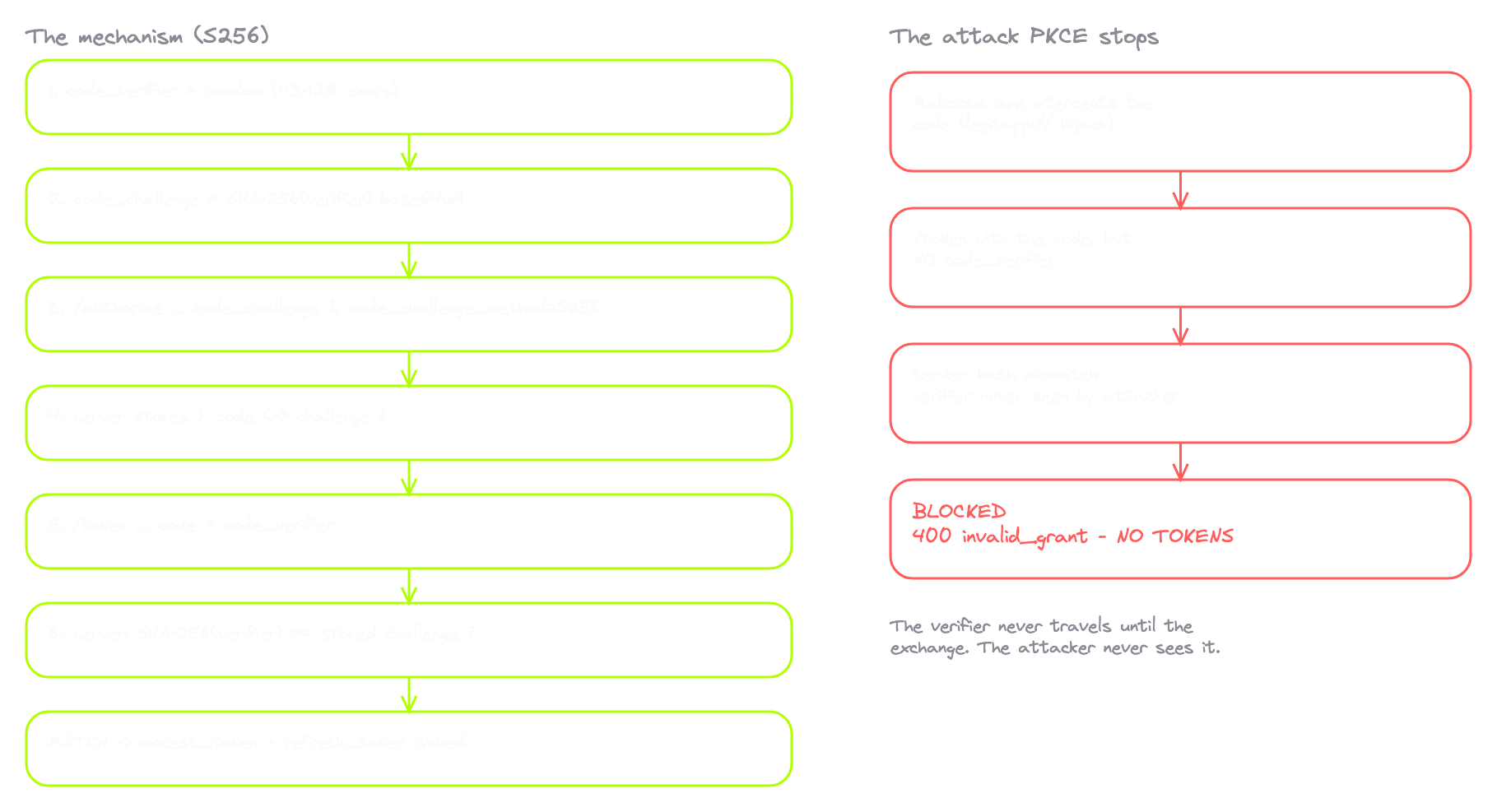
- Before starting the flow, the client generates a random string. Long. 43 to 128 characters. Cryptographically random. The spec calls this the
code_verifier. - The client hashes the verifier with SHA-256, then base64url encodes the result. The output is the
code_challenge. One-way. You can compute the challenge from the verifier, not the reverse. - The client sends the authorisation request like before, with two extra parameters:
code_challenge=<hashed value>andcode_challenge_method=S256. S256 means SHA-256. - The auth server stores the challenge alongside the authorisation code it's about to issue. This code was issued with this specific challenge attached.
- The redirect comes back with the code, like usual.
- The client makes the token exchange. This time, alongside the code, it includes the original
code_verifier. The raw random string from step 1. The thing the attacker has never seen. - The server hashes the verifier with SHA-256, base64url encodes it, and compares it to the stored challenge. Match means tokens. No match means rejected.
One random string, generated by the client, sent twice. First as a hash. Then as the original.
Here's roughly what the client does to generate the pair:
// 1. code_verifier: random, kept in memory, never sent until the exchange
const verifier = base64url(crypto.getRandomValues(new Uint8Array(48)));

// 2. code_challenge: SHA-256 of the verifier, base64url encoded
const digest = await crypto.subtle.digest('SHA-256', new TextEncoder().encode(verifier));
const challenge = base64url(new Uint8Array(digest));
PKCE on the wire
The authorisation request now carries the challenge:
GET /authorize?response_type=code
  &client_id=client_oidc
  &redirect_uri=https://amrsec.app:3201/callback/pkce
  &scope=profile email
  &state=k7Hq2Lp9Xc
  &code_challenge=E9Melhoa2OwvFrEMTJguCHaoeK1t8URWbuGJSstw-cM
  &code_challenge_method=S256 HTTP/2
Host: amrsec.app:3200
The callback comes back the same as before, just code and state. The PKCE protection lives in the next request, not the redirect. Because a SPA is a public client, the token exchange happens in the browser, so you can see it in your proxy, unlike the confidential case:
POST /token HTTP/2
Host: amrsec.app:3200
Content-Type: application/x-www-form-urlencoded

grant_type=authorization_code
&code=SplxlOBeZQQYbYS6WxSbIA
&redirect_uri=https://amrsec.app:3201/callback/pkce
&client_id=client_oidc
&code_verifier=dBjftJeZ4CVP-mB92K27uhbUJU1p1r_wW1gFWFOEjXk
No client_secret. There's the verifier instead, the original random string that's been sitting in the SPA's memory since before the flow started. The server hashes it, compares it to the challenge it stored in step 1, they match, and the tokens come back.
The negative test
Now prove it. Codes are single-use, so you can't just replay the legitimate exchange, the code is already dead. You intercept a fresh one before it lands. Enable intercept on POSTs to the token endpoint, start a fresh PKCE flow, sign in, and catch the /token POST before it leaves the browser. Delete the code_verifier from the body, or change its value to garbage, and forward it:
HTTP/2 400 Bad Request
Content-Type: application/json

{
  "error": "invalid_grant",
  "error_description": "PKCE verification failed: code_verifier required"
}
Rejected. The server saw the wrong hash and refused to issue tokens. Even though I had the code. Even though everything else in the request was identical. The verifier mismatch killed the exchange. That's the entire protection. The attacker who has the code but not the verifier gets exactly nothing.
S256 vs plain
The code_challenge_method has two valid values. S256, which I just showed you, and plain.
You should never see plain in production. In plain mode, the code_challenge is the verifier. No hashing. The client sends the random string as the challenge in the authorisation request, the server stores it as-is, and at the exchange the client sends the same string again as the verifier. The server compares them directly.
That defeats the entire protection. If the attacker can see the authorisation request, they read the challenge, which in plain mode is the verifier. They now have both halves of the secret. PKCE provides no defence against an attacker who can observe the flow at all. plain exists for legacy embedded systems that genuinely can't compute SHA-256. For anything modern, the server should reject any exchange where the method was plain. A server that accepts plain is a finding.
The PKCE downgrade attack
The bigger gap is when the server doesn't enforce PKCE at all. Imagine the legitimate client supports PKCE and sends the challenge. But the server doesn't actually require the verifier at the exchange. It just issues tokens without checking. An attacker who intercepts the code exchanges it without the verifier, because the verifier check never runs. PKCE is on the request but not on the server.
That's the PKCE downgrade attack. PKCE only protects you if the server actually enforces it. If the server treats PKCE as optional, the attacker sends a request without the verifier and the server hands out tokens anyway.
OAuth 2.1 makes PKCE mandatory for every client. Public clients have to use it. Confidential clients have to use it too, on top of their existing client_secret. The reasoning is simple. PKCE costs nothing. It's per-flow, automatic, invisible to the user. In modern Google, GitHub, and Microsoft flows you'll see the PKCE parameters even when there's also a client_secret behind the scenes.
PKCE is now the default. If you intercept an OAuth flow and you don't see code_challenge in the authorisation request, that itself is interesting. Either the client doesn't support PKCE, a sign of an older or weaker implementation, or it just isn't being used on this flow, which means whatever protection it would have provided isn't there. The protection holds if every server treats PKCE as required, not optional, and if no server accepts plain. It breaks the moment either assumption slips.
7. The Other OAuth Flows and OAuth 2.1
You just learned the Authorisation Code Flow with PKCE, the flow that handles most of the OAuth on the modern web. OAuth defines four others, each for a different kind of client. You don't need to deep-dive every one. What you need is recognition. Look at a flow in your proxy, see which one it is, and know whether it's modern, situational, or something that shouldn't exist at all.
| Flow | Recognition signature | Status |
|---|---|---|
| Authorisation Code (+ PKCE) | response_type=code, /authorize then back-channel /token | Current standard |
| Implicit | response_type=token, token in URL fragment, no token exchange | Deprecated, removed in 2.1 |
| Client Credentials | grant_type=client_credentials, no user, no redirect | Valid for machine-to-machine |
| Device Authorization | short user code + domain.com/activate, polling /token | Valid for input-constrained devices |
| ROPC | grant_type=password, username + password in body | Should never exist, removed in 2.1 |
Implicit Flow
The Implicit Flow looks almost identical to the Code Flow at the start. Same authorisation endpoint, same client_id, redirect_uri, scope, state. The one difference is response_type. The Code Flow uses response_type=code. Implicit uses response_type=token.
That single parameter changes everything. Instead of returning a code that gets exchanged at the back channel, the auth server returns the access token directly in the redirect. No back-channel exchange. No code. The token lands right in the browser, in the URL. And not just anywhere. The Implicit Flow returns it in the URL fragment, after the hash:
https://app.example.com/callback#access_token=2YotnFZFEjr1zCsicMWpAA&expires_in=3600&token_type=Bearer
The fragment isn't sent to the server when the browser follows the URL. But that doesn't stop the token from leaking. The browser puts the full URL in history. JavaScript on the page reads it from window.location.hash. Any browser extension has access to the page URL. Depending on referer policy, parts of the URL can leak in a Referer header.
The Implicit Flow was designed for SPAs back when PKCE didn't exist. Now that PKCE exists, it's deprecated, and OAuth 2.1 removes it entirely. But you'll still see it. Old apps, legacy integrations, providers that haven't updated their SDKs. response_type=token, callback parameters after the hash instead of a question mark, and no token exchange POST anywhere. Treat it as a red flag worth investigating.
Client Credentials
This one's different because there's no user at all. It's machine-to-machine. One backend service talking to another. No browser, no consent screen, no human in the loop.
The flow is one request:
POST /token HTTP/2
Host: auth.example.com
Content-Type: application/x-www-form-urlencoded

grant_type=client_credentials
&client_id=service_a
&client_secret=service_a_secret
&scope=read:artifacts
The server returns an access token. That's the whole flow. No redirect, no /authorize, just /token. Why does it exist? Applications talk to each other constantly. A CI pipeline pulling artifacts from a private repo. A microservice calling another microservice. A cron job hitting a third-party data provider every hour. None involve a user clicking a button. There's no refresh token here. When the access token expires, the service just runs the flow again.
For hunters, Client Credentials is mostly invisible from the user side. But if you come across leaked client credentials in a public GitHub repo, in a mobile APK that was supposed to be a confidential client, or in a config file accidentally exposed, those credentials let you mint tokens for that service directly. That's a real bug class. It happens more than people admit. Recognition: POST to /token with grant_type=client_credentials, no user-facing redirect, no refresh token in the response.
Device Authorization Flow
Ever signed into YouTube on a smart TV? Used GitHub's CLI? Set up a Roku? The TV or CLI tool can't host a browser flow. No full keyboard, no good way to type a URL and password on a remote.
The Device Authorization Flow delegates the auth step to a device that can run a browser. The TV asks the auth server for a flow start. The server returns two things. A short user code like WDJB-MJHT, and a verification URL like youtube.com/activate. The TV displays both. You take out your phone, go to the URL, enter the code, authenticate, and approve.
Meanwhile the TV is polling the token endpoint:
POST /token HTTP/2
Host: oauth.example.com
Content-Type: application/x-www-form-urlencoded

grant_type=urn:ietf:params:oauth:grant-type:device_code
&device_code=GmRhmhcxhwAzkoEqiMEg_DnyEysNkuNhszIySk9eS
&client_id=tv_app
Most polls come back pending. The user hasn't approved yet. The TV waits and tries again. When you finally approve on your phone, the next poll succeeds and the TV gets the access and refresh tokens. From then on, your TV is signed in.
Recognition: a short human-readable code on one device, a separate URL like domain.com/activate or domain.com/device, and a POST polling pattern to the token endpoint on a fixed interval. Its own bug classes exist too. Phishing where an attacker tricks the victim into typing the attacker's device code into their own browser, linking the attacker's device to the victim's account. Race conditions on the polling. Brute force against the short user code when rate limiting is weak. But the core mechanism is legitimate and necessary for input-constrained devices.
ROPC
Resource Owner Password Credentials. The flow that should not exist.
In ROPC, the client app collects the user's actual username and password. Not through OAuth. Not through a consent screen. The user types their credentials into a form in the client app, and the client POSTs them directly to the token endpoint:
POST /token HTTP/2
Host: auth.example.com
Content-Type: application/x-www-form-urlencoded

grant_type=password
&username=alice
&password=password123
&client_id=legacy_app
The auth server validates the password and returns an access token. Let that sink in. The client app has the user's password.
Remember the entire point of OAuth from section 4? It was designed to make the password anti-pattern go away. To stop third parties needing your password. To put the auth flow on the provider's domain so your credentials never touch the client. ROPC undoes all of it. The user types their password into the client. The client now sees it. If the client is compromised, the password leaks. If it stores it for "remember me," the password sits in their database. No MFA prompt, because the client controls the form. No consent screen, because there's nothing to consent to. No scope choice. It's just a password being passed through.
ROPC was originally included for one case. Helping organisations migrate from legacy non-OAuth systems where users were already trained to enter credentials directly. Even then it was discouraged. Now it's deprecated in the OAuth 2.0 best practices guide and completely removed in OAuth 2.1. Recognition: POST to /token with grant_type=password, username and password in the body, no /authorize step, and a client login form asking for the provider's credentials. See this on a target and it's a finding by itself. It breaks every guarantee OAuth was designed to provide.
OAuth 2.1
OAuth 2.1 is what happens when a decade of bug bounty reports, security research, and bad implementations get fed back into the spec. The working group looked at every way developers got OAuth 2.0 wrong over fifteen years and baked the best practices directly into the protocol.
| Change | Effect |
|---|---|
| PKCE mandatory for every client | Closes the entire family of code-interception attacks |
| Implicit Flow removed | No longer a valid grant type |
| ROPC removed | No longer a valid grant type |
| Refresh token rotation required for public clients | Reuse detection becomes mandatory, not optional |
| Bearer tokens banned from URL query strings | Stops tokens leaking into logs, Referer headers, history |
Exact redirect_uri string matching | No prefix matching, no wildcards, no path traversal tricks |
That last one is the most important hardening change, because redirect_uri matching bugs were the source of countless real-world OAuth account takeovers.
For hunters, this is your safety baseline. Anything in the wild that violates one of these rules is potentially reportable. A server still accepting Implicit flows. A server allowing wildcard redirect URIs. A server taking bearer tokens in the query string. Every one is a sign of an older or weaker implementation, and every one is the kind of gap real account takeovers have been built on. The protocol gives you the tools. The protection only holds if the server enforces them.
8. OpenID Connect: The Identity Layer
OAuth answers one question. What is this app allowed to do with this user's data? That's authorisation. Permission. Access.
OAuth does not answer the other question. Who is this user?
That seems strange. Every "Sign in with Google" button feels like authentication. The user shows up, the app knows who they are, job done. But that's not what OAuth does. OAuth gives the app permission to call Google's APIs on the user's behalf. The app can then call Google's userinfo endpoint and ask "tell me about the user who authorised this token." That's a workaround. OAuth itself never carried the user's identity. Apps were hacking identity on top of an authorisation protocol because there was no standard for the real thing.
Until 2014. A new specification got published on top of OAuth. It added the missing identity layer. It standardised how the user's identity is proven, what format the proof takes, and how the client should validate it. That spec is OpenID Connect. OIDC.
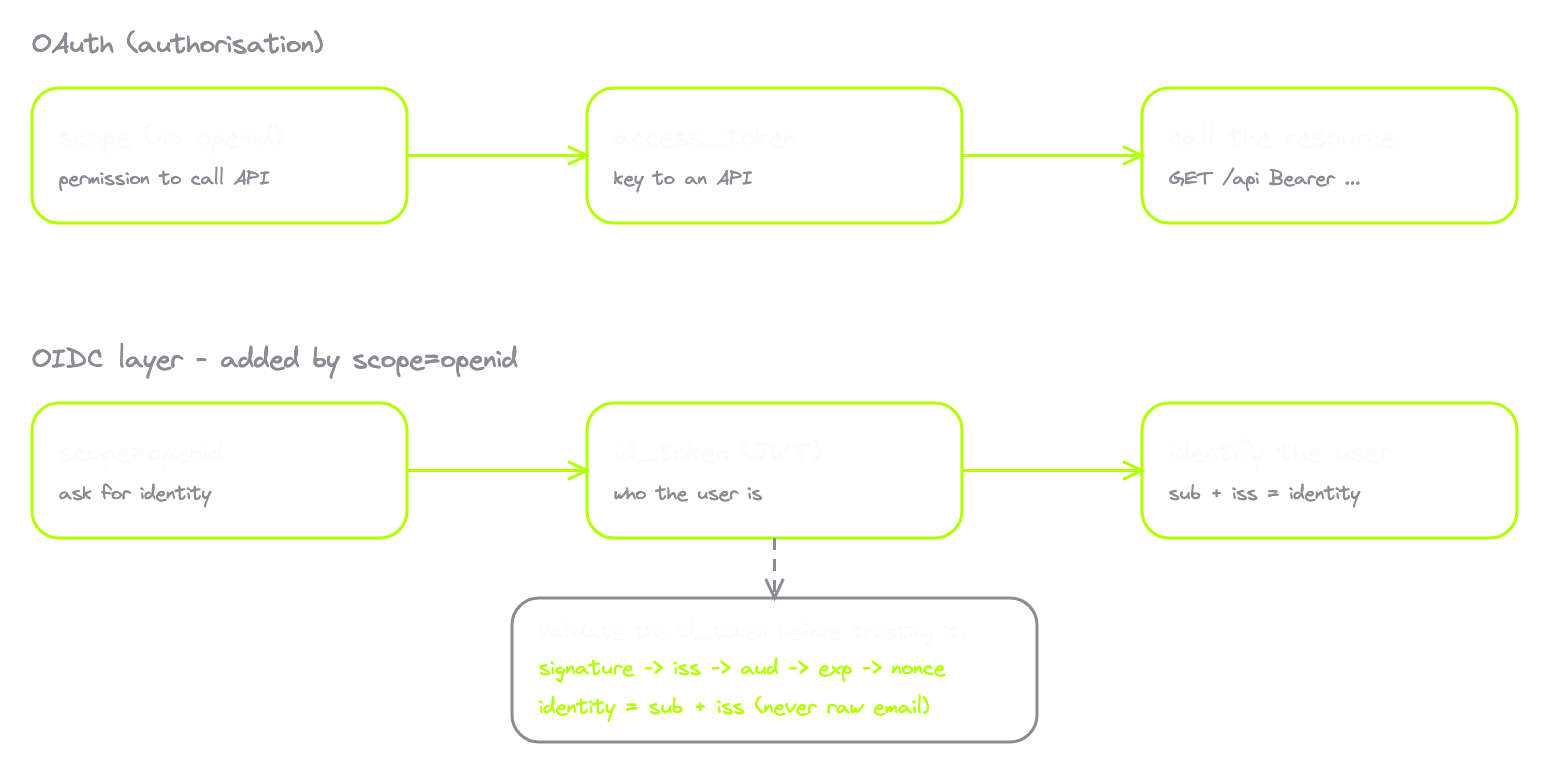
OIDC is not a replacement for OAuth. It's a layer on top. Every OIDC flow is an OAuth flow underneath. Same redirects, same code exchange, same access tokens. OIDC just adds one more thing alongside the access token. A new kind of token. The ID Token.
| Access token | ID token | |
|---|---|---|
| Says | "This app has permission to do X" | "This user is who they say they are" |
| It's a | Key to an API | Statement of identity |
| Audience | Resource server | The client app |
| Format | Often opaque, provider's choice | Always a signed JWT |
| Used for | Calling resources | Identifying the user |
How do you turn an OAuth flow into an OIDC flow? You add one scope. openid. When the client requests scope=openid along with the others, the auth server treats it as an OIDC flow and returns an ID Token alongside the access token. The full request usually looks like scope=openid email profile, asking for identity plus email plus profile claims. The ID Token is always a JWT. Signed. Verifiable. With a standardised payload of identity claims.
Inside the ID token
Decode an ID token and the payload is what makes it an ID token instead of just any JWT:
{
  "iss": "https://amrsec.app:3200",
  "sub": "auth0|12345",
  "aud": "client_oidc",
  "exp": 1717503600,
  "iat": 1717500000,
  "nonce": "n-0S6_WzA2Mj",
  "email": "[email protected]",
  "email_verified": true,
  "name": "Alice"
}
| Claim | Meaning | Why a hunter cares |
|---|---|---|
iss | Issuer, the OpenID Provider | App must verify this matches the provider it expected, or it accepts tokens from any issuer |
sub | Permanent unique user ID within this issuer | The only thing you should trust as identity. Not email, not username |
aud | The client_id this token was minted for | App must verify this is its own client_id, or it's a token confusion attack |
exp / iat | Expiry and issued-at | App must check the token hasn't expired |
nonce | Random value the client sent, echoed back | Replay protection. Must match what the client sent |
email | The user's email | A profile attribute. It can change. It can be claimed by anyone |
email_verified | Has the provider confirmed the user owns this email | The most under-checked claim in OIDC |
name | Display name, plus picture/locale on real providers | What you populate a profile from |
On a real target like Google, iss would be https://accounts.google.com and sub would be a stable opaque string instead of auth0|12345. The signature is the same as any JWT. The app fetches the provider's public keys from the JWKS endpoint, verifies the signature, and only then trusts any claim inside.
Sign in with Google, end to end
The user clicks the button. The client redirects to Google's authorisation endpoint. The request looks just like the Code Flow, with three additions. The scope includes openid. The request includes a nonce, a random value that gets echoed back in the ID Token as replay protection. And it uses PKCE, because every modern OAuth flow does.
The user authenticates at Google and approves the consent screen, which lists the scopes including OIDC-standard ones like email and profile. Google redirects back with the authorisation code. The client makes the token exchange, POSTing the code, the PKCE verifier, and the client_secret if it's a confidential client. Google's response contains the access token, the refresh token if requested, the ID Token, and expires_in.
Now the client has to validate the ID Token before doing anything with it. This is where most OIDC implementation bugs live:
- Check the signature using Google's public keys, fetched from the JWKS endpoint discovered via
accounts.google.com/.well-known/openid-configuration. - Check
issmatcheshttps://accounts.google.com. - Check
audmatches its own client_id. - Check
expis in the future. - Check
noncematches the value it sent in the authorisation request.
Only after all of that passes does the client trust the claims. Then it uses them to identify the user. The sub claim becomes the user's permanent identifier in the app's database. The email is stored for display. The name and picture populate the UI. The access token is set aside for the resource server. The access token never carries identity. The ID Token never accesses resources. Separate tools for separate jobs.
The email_verified takeover
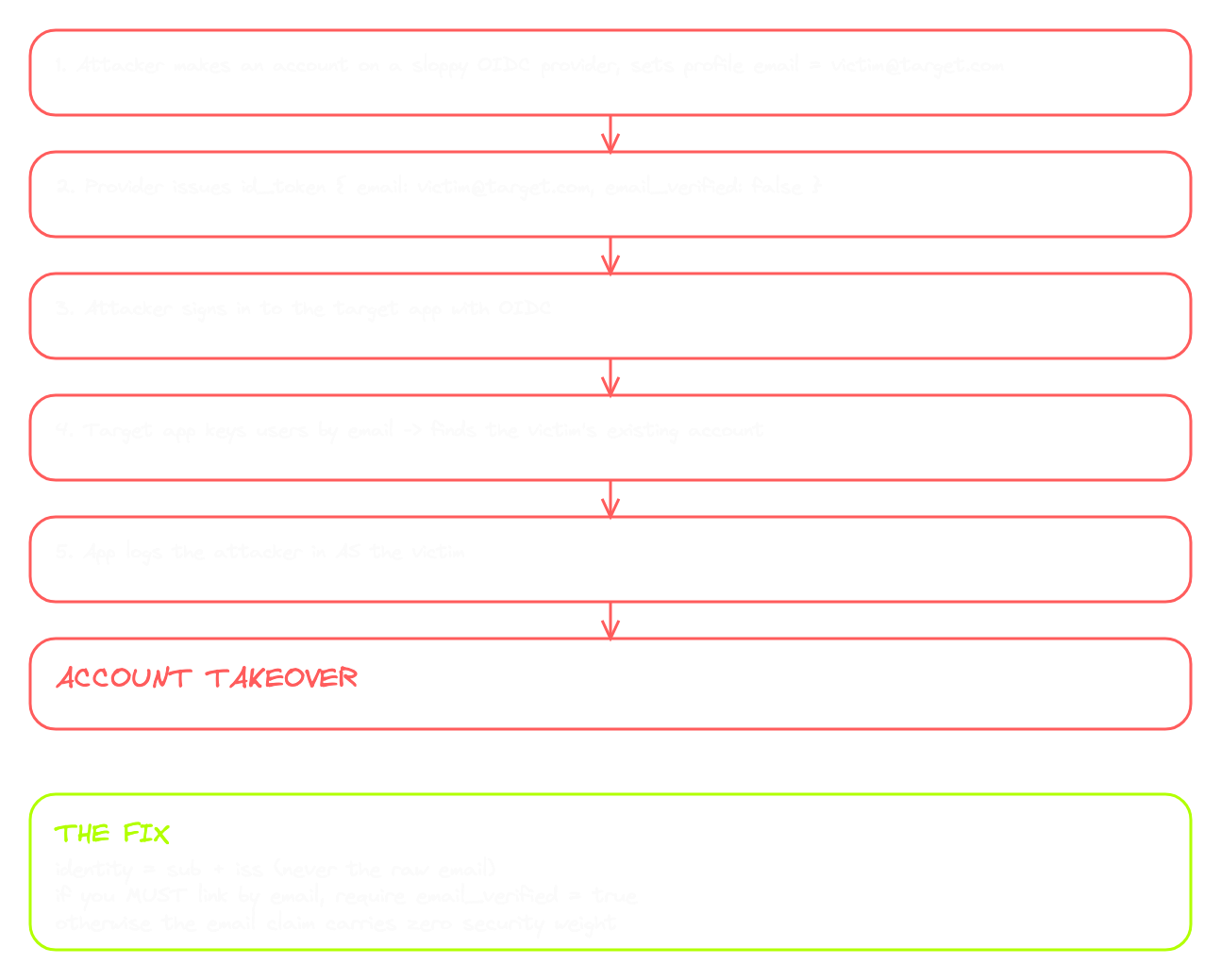
I told you email_verified was the gap. Here it is.
A lot of apps treat OIDC the same way they treat their own login system. They store users by email. When someone signs in through OIDC, the app looks at the email claim in the ID Token, finds the matching user record, and signs them in.
The problem is that email is just a profile attribute. It can change. It can be claimed by anyone. And critically, the OIDC provider may have never verified that the user actually owns it.
Picture this. Attacker creates an account on an OIDC provider that doesn't verify email ownership. They put the victim's email into their profile. The provider issues an ID Token with [email protected] and email_verified=false. The attacker signs into the target app using OIDC. The target app looks at the email, finds the victim's existing account, and treats this OIDC session as the victim. Account takeover.
The fix is to use sub plus iss together as identity, not email. Email is a profile attribute that can change. iss plus sub is a permanent unique identifier scoped to the provider. If the app must link OIDC users to existing accounts by email, at minimum it has to check email_verified=true before trusting the email. If it doesn't, the email claim is worthless from a security standpoint. This is the most common SSO misconfiguration in the wild. The email claim is a string. It only carries security weight when email_verified is also true. And the only identifier you should actually trust as identity is sub, scoped to the issuer.
OIDC vs SAML
OIDC is the modern protocol for federated identity on the consumer web. Sign in with Google, Apple, Microsoft. All OIDC. But it has an older cousin that still dominates the enterprise world. SAML. Security Assertion Markup Language, current version 2.0 from 2005.
| OIDC | SAML | |
|---|---|---|
| Era | 2014, modern | Early 2000s, enterprise |
| Format | JSON + JWT | XML |
| Identity proof | id_token (JWT) | SAML Assertion (XML document) |
| Signature | JWT signature | XML signature |
| Flow shape | HTTP redirects with JSON | Form POST that auto-submits an XML response |
| Endpoints | /authorize, /token, JWKS | /saml/sso, /saml/acs, /saml/login |
| You'll spot | id_token, /.well-known/openid-configuration | SAMLRequest, SAMLResponse, base64 XML blobs |
| Bug classes | JWT validation, audience confusion, nonce reuse, claim trust | XML signature wrapping, XXE, audience confusion, assertion replay |
SAML dominates enterprise SSO. If your company uses Okta, Microsoft Entra, OneLogin, or Ping Identity to log into Salesforce, Workday, or ServiceNow, that's almost certainly SAML under the hood. You can spot it in seconds. Big XML blobs, often base64 encoded, in form fields named SAMLRequest or SAMLResponse. No JWT. No /token endpoint. No /authorize redirect with five parameters. A completely different protocol with a completely different shape.
You don't need to exploit SAML here. You just need to know which one you're looking at. JWT and JSON and id_token? OIDC. XML and form auto-submits and SAMLResponse? SAML.
That's OpenID Connect. OAuth tells the app what it can do. OIDC tells the app who the user is. Different tokens, different validation, different bug classes. And the most important claim in the entire spec is the one most apps forget to check. email_verified. Keep that one in your head.
9. The Security Design Table
Up to this point, every section taught you how a piece of the auth stack works when it's implemented correctly. This section is different. This is the shift in how you look at auth flows from now on. From reading the protocol to reading the implementation. From seeing the design to seeing the gaps.
Here's the mental model. Every protection in the auth stack exists for a specific reason. Someone, somewhere, broke a real system, and a protection got added to the spec to close that gap. So if you can answer two questions about every protection, you've stopped reading auth flows and started hunting them.
Question one. What attack does this protection prevent? Question two. What happens if this protection isn't there?
Answer both for every protection and you've inverted the problem. You're no longer spotting bugs by trial and error. You're scanning for absences. You look at a flow and notice the protection that should be there but isn't, and the moment you spot one, you already know what attack it enables. That's how the best auth hunters work. Not by memorising payloads. By holding the protection map in their head and reading flows for missing pieces.
Here's the map.
| Layer | Protection | What attack it prevents | What happens when it's missing |
|---|---|---|---|
| Session | HttpOnly flag | JavaScript reading the session cookie | Every XSS on the domain becomes session theft and account takeover |
| Session | SameSite flag | Cross-site requests carrying the cookie | CSRF on every state-changing endpoint without its own token |
| Session | Secure flag | Cookie sent over plain HTTP | Cookie leaks on any accidental HTTP request, sniffable on the wire |
| Session | Unguessable session ID | Guessing or enumerating sessions | Attacker walks the user table by incrementing IDs |
| JWT | Signature verification | Payload tampering | Token becomes a base64 string the attacker rewrites at will (roles, identity, scope) |
| JWT | Algorithm allowlist | Trusting the client-declared alg | alg:none, RS256-to-HS256 confusion, key confusion |
| OAuth | state validation | Binding the callback to the session | OAuth CSRF, account linking, pre-auth hijack, account takeover |
| OAuth | Exact redirect_uri match | Codes going to attacker URLs | Code theft, then token theft, then takeover |
| OAuth | PKCE enforcement | Authorisation code interception | Code interception attacks come back from the dead |
| OAuth | Back-channel exchange | Tokens travelling through the browser | Tokens leak via history, Referer, and page JavaScript |
| OAuth | client_secret integrity | Anyone impersonating the client | An attacker mints tokens as that application |
| OAuth | Short-lived access tokens | Long damage windows on leak | A single leak becomes a long-term backdoor |
| OAuth | Refresh token rotation + reuse detection | Stolen refresh tokens used indefinitely | Theft becomes invisible and indefinite |
| OAuth | Server-side scope enforcement | Tokens doing more than granted | Every token is effectively a full-access token |
| OIDC | email_verified + sub-based identity | Trusting an unverified email claim | SSO account takeover by claiming the victim's email |
That's the table. Read every row and you can recite the attack it blocks and what happens when it's missing.
If you're new to auth, this looks like a checklist of things to learn. If you've been doing this long enough, this is exactly how you hunt. You intercept a flow and start scanning. State? Check. PKCE? Check. Exact redirect_uri match? Check. SameSite? Check. HttpOnly? Check. Signature verification? You test this one explicitly, but you know how. Refresh rotation? You watch for it across a refresh cycle. Scope enforcement? You probe by calling endpoints with mismatched scopes.
Every check passes, the flow is solid. The moment a check fails, you don't ask "what kind of bug might be here?" You already know. You read the gap and immediately match it to its bug class, because the table is in your head.
That's the shift. Reading the protocol becomes reading the implementation. The protocol tells you what should be there. The implementation tells you what actually is. The gap between the two is the bug.
10. Where This Leaves You
That's auth. Not all of it. There's always more. But everything you need to read any flow on any target.
You came in knowing what state and code_challenge and redirect_uri look like in a request. You're walking out knowing why each one exists, what each one protects, and what happens when each one is missing.
You came in seeing sessions and JWTs as two different things. Now you can explain why they exist for the same reason. Stateful versus stateless. DB lookup versus signed token. The session is a record on the server. The JWT is a record in your hand.
You came in confusing OAuth with authentication. Now you know OAuth is permission and OIDC is identity. The access token is for the API. The ID token is for the app. Different jobs, different validation, different bug classes.
You learned the six-step Authorisation Code Flow and why the back-channel exchange exists. You learned PKCE and why it's now mandatory. You learned the four other flows and which ones shouldn't exist anymore. You learned OAuth 2.1 and which protections it locks in by default. And then you got the Security Design Table. Eleven protections paired with the bug classes that appear when they're missing. The lens you carry into every auth flow from this point on.
If you got through this, you can do something most hunters can't. You can open an OAuth flow in your proxy, read every parameter, name every protection, and immediately see what's there and what's not. That's the skill. The only thing left is putting it to work on real targets.
I said at the start I wasn't going to break any of these flows here. That holds. Breaking is a piece of its own, and I'm already building it. Every row of that table, exploited live. Real CSRF on missing state. Real code theft on weak redirect_uri matching. Real signature bypass on JWT misconfiguration. Real SSO takeover on missing email_verified. Real PKCE downgrade. Real session hijack on missing HttpOnly. Each protection turned into the real attack that lives when it's gone.
You can't break what you don't understand. Now you understand it.